Skip to content
Folio
Sign In Get started
Workflow-specific products Content, decks, visuals, briefs, proposals, legal, books, and project delivery each have a clearer buying path.
Review before delivery Draft, edit, collaborate, approve, and export in the same workspace.
Security + procurement path Security policy, support, and Azure Marketplace buying are public.
Books comparison

Atticus alternative for AI-assisted book writing

Atticus combines writing and formatting in a one-time purchase. Folio adds AI chapter drafting, manuscript consistency review, and edition workflows to a free manuscript workspace. Compare the assistance, output controls, and costs for your book.

Monthly vs one-time This is the closest pricing-shape comparison in the Books market.
AI workflow Brief, chapter drafting, review, and export live in one product.
6 exports EPUB, editable DOCX, chapter PDF, HTML, Markdown, and SCORM stay inside the same book workflow.
87 Locale variants supported for international editions after the source manuscript is complete.
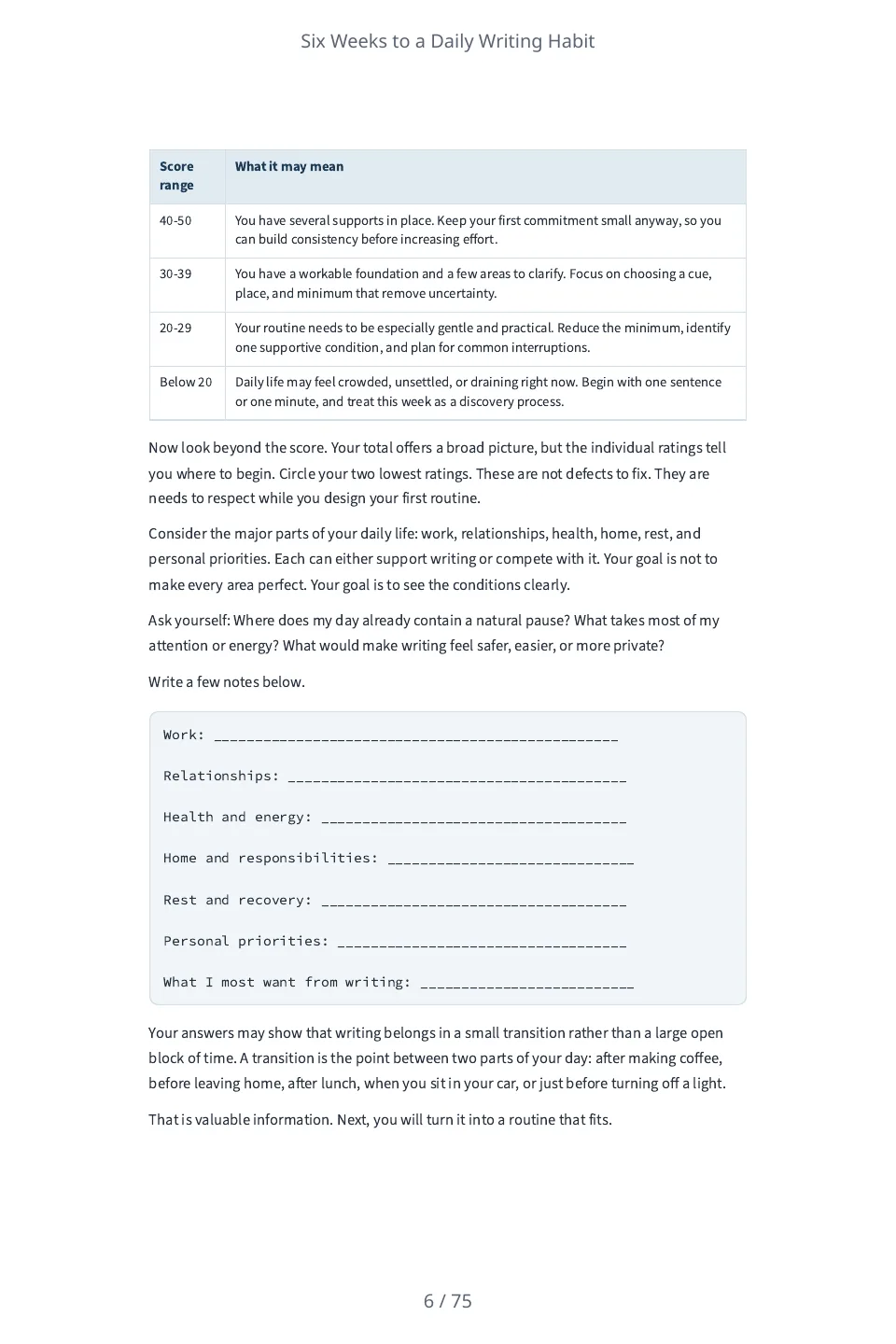
An exercise page of the workbook: a table that turns the reader's self-rating score into what it may mean, and ruled lines to write on.
A finished book to inspect · Workbook

Six Weeks to a Daily Writing Habit

A six-week workbook of short exercises and reflection prompts for adults who want to start a daily writing habit. Each week is one chapter with ten-minute exercises to do with pen and paper, blank lines to write on and a page to look back on the week. Folio wrote it from one paragraph; each chapter runs about 3,000 to 3,800 words where the brief asked for about 2,800.

6 chapters · 21,038 words · 75-page PDF. It has not been edited, so judge the prose and the file for yourself.

Inspect the source brief

A six-week workbook of short exercises and reflection prompts for adults who want to start a daily writing habit. Each week is one chapter of about 2,800 words with a few ten-minute exercises the reader does with a pen and paper, and a short page to look back on the week. Audience: Adults who want to write a little every day and have never kept the habit. Tone: Encouraging and practical. Do not state any statistic, study, survey, quotation, case study, testimonial or named person, and do not describe what research shows. Do not describe hypothetical writers or give anyone a name: speak to the reader as 'you'. Every exercise is something the reader does themselves with a pen and paper.

Read the sample review notes

Screened mechanically for what the brief forbade (a statistic, study, survey, quotation, case study, testimonial, named person or a claim about what research shows): the only figure is the ten minutes an exercise takes, and no person is named. It carries blank lines for the reader to write on. Nobody has edited the text, and nobody has read it for quality.

Write, review and prepare the same book for handoff

Folio keeps more than a draft: chapter edits, sources, reading coverage, reader suggestions and edition proofs remain attached to the book and its recorded revisions.

Choose the edit that fits the job

Write manually or request chapter prose. Continue and AI Write add text; Quick AI and Power Edit work on selections; Ask Folio proposes changes you review.

AI assistance can change meaning or invent details. Inspect saved versions and every proposed revision.
Keep research and review accountable

Attach readable sources, inspect extraction and passage coverage, run focused editorial passes and record claim/canon or reader-feedback decisions.

Bounded review and author approvals are not independent fact-checking. Changed inputs may make findings stale.

Keep proof and handoff with the revision

Freeze an edition, inspect the actual files, retain proof notes and prepare a handoff from the reviewed artifact.

Measured preflight is guidance. You own rights, final editing, platform requirements and the retailer upload.

Start blank, import and manually edit your own book. Its downloads and proofs do not need an active Folio subscription. New AI planning, drafting and editorial assistance need eligible access; translation and narration use separate edition conditions. Existing book view, comment and edit permissions apply.

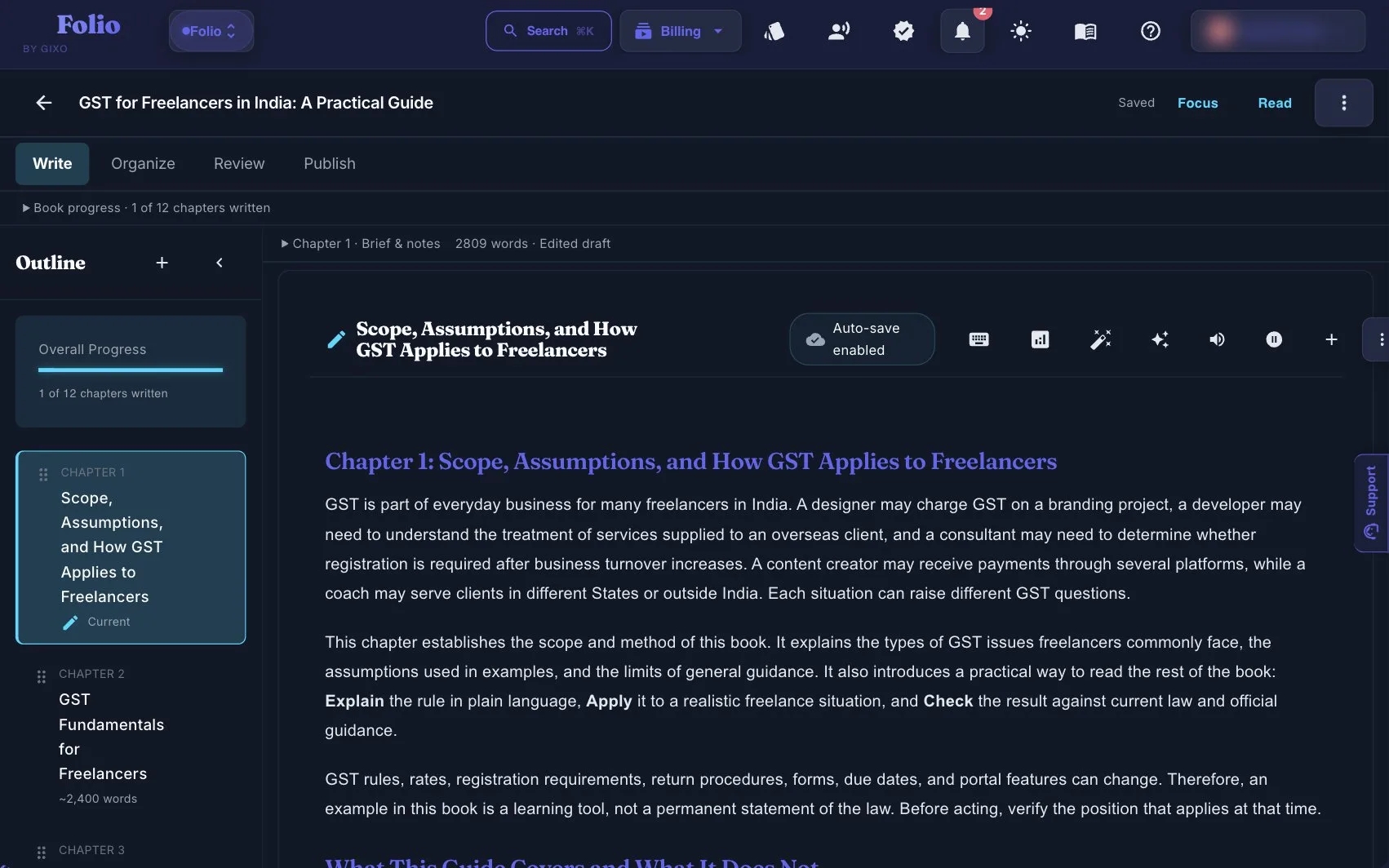
A saved book in the Gixo Folio workspace, with its chapter outline beside the current chapter
A saved book in the Gixo Folio workspace: the chapter outline on the left, the first written chapter on the right, and Organize, Review and Publish as the later stages. One of its twelve chapters is written here, so this shows the drafting stage, not a reviewed book or a finished file.
01Brief the book
02Shape the outline
03Draft chapters
04Review the manuscript
05Export the edition
Folio is a strong fit whenThe manuscript still needs structure, revision, and a finish line.

Use the persistent book workspace when the outcome is a real guide, authority book, training manual, client asset, or exportable edition.

Consider another tool whenYou only need one narrow part of the publishing job.

If your manuscript is already finished and you only need specialist formatting or a dedicated fiction system, a focused tool may be the simpler choice.

Which Folio workflows to compare with Atticus

Both products support writing and export. Test the AI assistance, review, and formatting controls you actually need.

Start earlier
Plan and draft the manuscript in the same tool
Use a structured brief and chapter workflow before formatting enters the picture.
AI assistance
Generate and revise chapters with context
Folio drafts chapters from a structured brief and outline. Compare the revision effort on your own material; this page does not provide a measured quality ranking.
Manuscript review
Finalize chapters before export
Review and revise each chapter in the workspace so the exported file matches the intended final state of the book.
Delivery
Export directly from the workspace
The final file download path is stable and built into the Books export flow.
Edition path
Localize once the source version is ready
Create international editions across 87 locale variants from the same project.
Best fit
Better for authority books and client assets
If the book is part of a business workflow, the brief-to-export model is often more useful than a formatting-first tool.

How to choose between Atticus and Gixo Folio

Pick the product that starts where your real bottleneck starts.

1
If your draft already exists
Atticus is still compelling when the manuscript exists and the main job left is formatting and layout.
2
If the hard part is the manuscript
Choose Gixo Folio when you still need help planning, drafting, reviewing, and finishing the book.
3
If you want bounded spend
Atticus has a one-time license; Folio is monthly, so compare a formatting purchase against the paid months you need for AI chapter drafting.
4
If you may localize later
Gixo Folio is stronger if the project may become multiple editions after the source book is finished.

Gixo Folio vs Atticus

Compare Folio AI drafting and editions with Atticus writing and formatting; validate the output with the same sample manuscript.

Decision areaGixo FolioAtticus
Primary fitAI manuscript workflow plus exportWriting and formatting software
AI draftingBook brief and chapter draftingAsk Atticus: the pages checked do not mention AI drafting
Formatting-first use caseGood export workflow, not sold as a layout specialistFormatting is central to the product
Pricing shapeMonthly plans for active book projectsOne-time software license
Edition strategyInternational editions across 87 localesAsk Atticus: the pages checked do not mention translated editions
Best forBuyers who need the manuscript and the final fileAuthors who already have the manuscript and want formatting control
Comparison basis
Vendor documentation, not a hands-on score

Checked 6 November 2026 against the Atticus home page, the Atticus quick-start documentation and the Scrivener Compile guide linked below. The Atticus pages establish a one-time purchase that runs in a browser on Windows, Mac, Linux and Chromebook and exports EPUB, PDF and DOCX; they do not settle AI drafting or translated editions, so ask Atticus about both. These describe supported workflows; no matched-output quality test is claimed here.

Where Atticus still wins
Formatting-first ownership

If you already have the manuscript and the only real problem left is formatting and presentation, Atticus remains a serious option. Its one-time license story is easy to understand and its positioning is clear.

That is a different problem from creating and finishing the manuscript itself.

Where Gixo Folio is stronger
The book still needs to be written, reviewed, and shipped

Gixo Folio is more useful when the draft is not done yet. It helps with planning, chapter generation, revision, export, and edition expansion from the same source manuscript.

That makes it a stronger Atticus alternative for solo professionals who need the manuscript workflow, not just the formatter.

Frequently Asked Questions

Is Gixo Folio cheaper than Atticus?
The closer comparison is the buying shape, not just price. Gixo Folio is monthly for AI chapter-drafting months, while Atticus is a one-time formatting-centered purchase.
Should I choose Atticus or Gixo Folio if I already finished my manuscript?
If your manuscript is already done and the main job is formatting, Atticus is still a logical choice. If you need planning, drafting, review, and export in one place, choose Gixo Folio.
Does Gixo Folio support EPUB and PDF export?
Yes. Books supports PDF and EPUB alongside HTML, Markdown, and SCORM export.
Can Gixo Folio create localized editions?
Yes. After the source version is final, Gixo Folio supports international editions across 87 locale variants.
Can I use both Atticus and Gixo Folio?
You could, but if Gixo Folio handles the manuscript and export, a separate formatter may not be necessary. Evaluate whether the built-in export formats meet your needs first.
Atticus vs Scrivener: what's the difference?
Scrivener supports long-form writing and organization, and its Compile feature assembles manuscripts into formats including PDF, DOCX, and EPUB. Atticus combines writing and book formatting. Folio adds a brief-to-chapter AI workflow, manuscript consistency review, and edition workflows. Compare the specific output controls you need; all three can participate in preparing a book.
Atticus vs Vellum: what's the difference?
Atticus includes writing as well as formatting; Vellum is focused on book formatting on macOS. Compare platform support and the actual interior you want to produce. Folio is another option when AI chapter drafting, consistency review, or later editions are part of the job.
Need more than a formatter?
Review the Books pricing page if the manuscript still needs planning, drafting, revision, and delivery inside one product.

Updated