
Skip to content
Sign In Try Free
Workflow-specific products Content, decks, briefs, proposals, legal, and sales each have a clearer buying path.
Review before delivery Draft, edit, collaborate, approve, and export in the same workspace.
Security + procurement path Security policy, support, and Azure Marketplace buying are public.
Books comparison

Scrivener alternative for authors who want help drafting the book

Scrivener is a one-time desktop app for organising and writing a long book yourself, then compiling it to Word, PDF, EPUB, Kindle and more. Gixo Folio is a browser workspace that plans the chapters, drafts them with AI from your outline, audits the manuscript and exports EPUB, DOCX and a print PDF. Choose Scrivener for control and offline ownership; choose Folio when getting a complete draft is the hard part.
One-time vs monthly Scrivener is about $59.99 for macOS or Windows; Folio Author is $19/mo.
Desktop vs browser Scrivener runs on your machine; Folio runs in the browser.
Compile vs export Scrivener compiles to more formats; Folio exports EPUB, DOCX, print PDF, HTML and Markdown.
0–100 Folio's manuscript consistency score, produced by its whole-book audit.
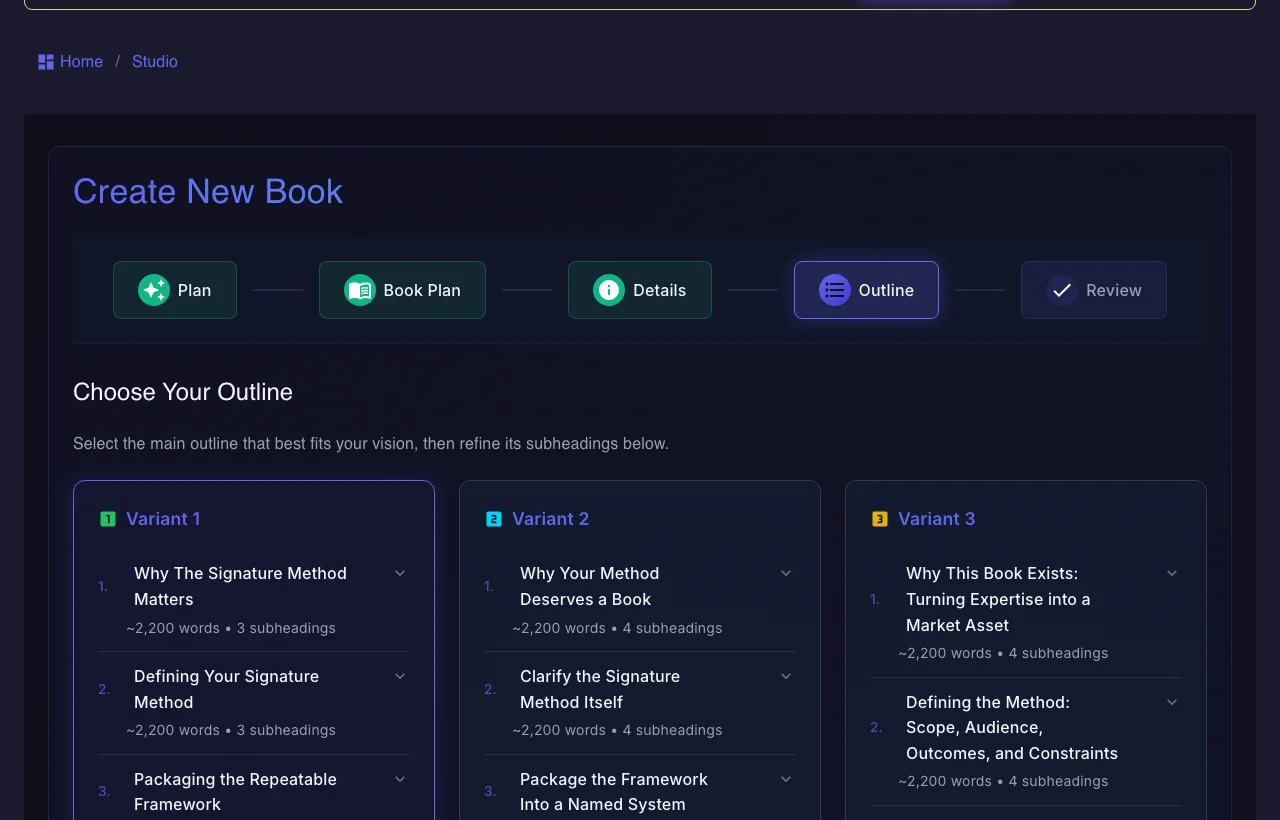
Gixo Folio offering three alternative book outlines to choose from before drafting
Folio offers three outline variants before drafting — the plan the chapters are then drafted from.
01Brief the book
02Shape the outline
03Draft chapters
04Review the manuscript
05Export the edition
Folio is a strong fit whenThe manuscript still needs structure, revision, and a finish line.

Use the persistent book workspace when the outcome is a real guide, authority book, training manual, client asset, or exportable edition.

Consider another tool whenYou only need one narrow part of the publishing job.

If your manuscript is already finished and you only need specialist formatting or a dedicated fiction system, a focused tool may be the simpler choice.

What changes when you move from Scrivener to Folio

Folio replaces the drafting and review work, not Scrivener's organising depth.

Structure
Parts, chapters and scenes
Folio supports parts, moving and splitting chapters, scenes with point of view, time and location, and a stash for cut text.
Drafting
AI drafts from your plan
Chapters are drafted from the outline you approved, in order, with earlier chapters as context. Author includes 10 AI chapters a month.
Revision
Rewrite, expand, simplify
Select text to rewrite, simplify, expand or fix grammar; Folio snapshots the chapter before every AI rewrite so you can restore it.
Review
Editorial passes and an audit
Developmental, copy, factual, continuity and production passes record issues with evidence, alongside the whole-book consistency audit.
Research
A Story Bible instead of a research folder
Store characters, settings, terms, frameworks, case studies, data points and sources, and keep them in view while drafting.
Output
One export path
Folio exports EPUB, editable DOCX, print-ready full-book and chapter PDF at standard book trim sizes such as 6×9, 5.5×8.5, and 5×8 inches, HTML, and Markdown from one export path. Eligible higher-tier workflows can also produce SCORM and white-label output.

How to choose between Scrivener and Gixo Folio

Both hold a whole book. They disagree about who writes the first draft.

1
If you write every word yourself
Scrivener gives you more organising tools and more Compile targets for a one-time price, and it works offline.
2
If the first draft is where you stall
Folio drafts chapters from your plan so you revise instead of starting from a blank page.
3
If you need screenplay or LaTeX output
Stay with Scrivener: its Compile covers Final Draft and MultiMarkdown or LaTeX, and Folio's export does not.
4
If the book becomes audio or other languages
Folio builds audiobook and translated editions from the finished book in the same workspace.

Gixo Folio vs Scrivener

Scrivener figures read from literatureandlatte.com on 25 September 2026 — treat them as approximate.

Decision areaGixo FolioScrivener
Price$19/mo Author, $99/mo Pro, monthlyAbout $59.99 one-time for macOS or Windows; about $23.99 for iOS
TrialTry AI chapters, then subscribe to keep drafting30 days of actual use
Where it runsBrowserDesktop and iOS apps, offline
AI chapter draftingFrom your approved chapter planNot an AI drafting tool
Manuscript reviewConsistency audit and editorial passesYou review the manuscript yourself
OutputEPUB 3, DOCX, print PDF, HTML, MarkdownWord, RTF, PDF, EPUB and Kindle, Final Draft, MultiMarkdown and LaTeX
EditionsAudiobook and translated editions (89 locales)Not offered
Comparison basis
Read from Literature & Latte's own pages

Scrivener's price, trial and Compile formats were checked against literatureandlatte.com on 25 September 2026; treat non-Gixo figures as approximate. Scrivener's store page did not display desktop prices that day, so the desktop figure comes from its crossgrading page.

Where Scrivener wins
Ownership, offline work and Compile range

Scrivener is the long-form organiser many novelists and researchers already trust. A one-time licence, offline desktop apps and a Compile step that reaches screenplay and LaTeX formats are real advantages, and Folio matches none of them.

If you write every word yourself and value control over the output, Scrivener is the better tool.

Where Gixo Folio is the better fit
When you want the draft to exist

Folio is for authors whose bottleneck is producing a complete, consistent draft. It plans the chapters, drafts them from that plan, reviews the whole book, and exports files you can take to a retailer — with the audiobook and translated editions built from the same book.

You still supply the ideas, experience and judgment, and you revise every chapter.

Frequently Asked Questions

What is a good Scrivener alternative with AI?
Gixo Folio drafts chapters with AI from a chapter plan, then lets you revise, audit and export the manuscript in the browser. It is a different shape of tool: less organising depth than Scrivener, more help producing the draft.
Is Scrivener free?
No. Scrivener offers a free trial that lasts 30 days of actual use, then costs about $59.99 one-time for macOS or Windows, read from literatureandlatte.com in September 2026. Non-Gixo figures are approximate and may change.
Can I import a Scrivener project into Gixo Folio?
Compile the project to Word (DOCX) or plain text and import that file; Folio splits it into chapters. Scrivener's own project format is not imported directly.
Does Folio have a corkboard like Scrivener?
No. Folio organises the book as parts, chapters and scenes with a Story Bible alongside, but it has no corkboard view. If you plan visually on index cards, Scrivener suits that better.
Can Gixo Folio compile to Kindle and print like Scrivener?
Folio exports EPUB 3 for ebook stores, including Kindle via KDP, and a print PDF at standard trims such as 5 × 8, 5.5 × 8.5 and 6 × 9. It does not export Final Draft or LaTeX.
Scrivener vs Atticus vs Folio: which should I pick?
Scrivener to organise and write it yourself, Atticus to write and format in one app, Folio to plan, draft with AI, audit and export. All three can produce ebook files; they differ in who does the drafting.
Want the first draft to exist?
Plan the chapters, draft them from that plan, audit the book and export it — in the browser, from one workspace.