
Gixo integrations guide
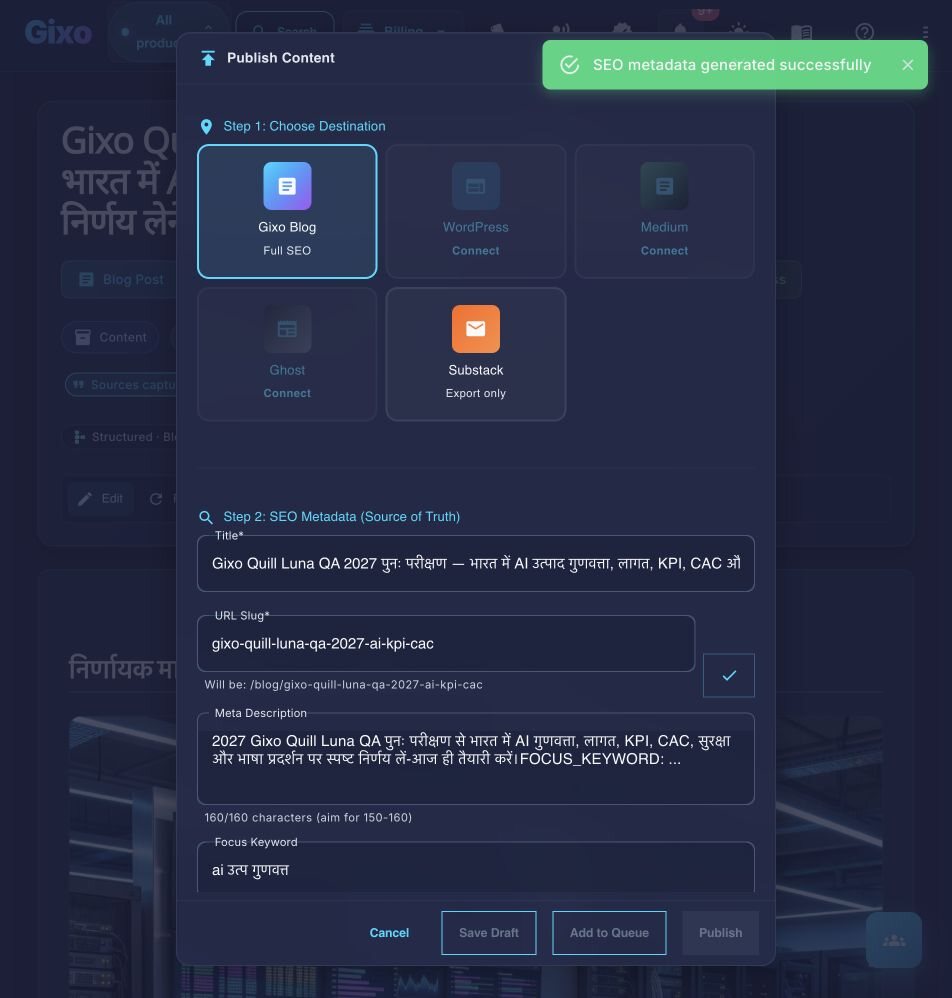
Send approved work to connected WordPress and Ghost sites, export for Medium or save a draft through an available legacy-token connection in the article form, or export for other destinations. Export in PDF, DOCX, HTML, Markdown, TXT, and JSON for other destinations.
How It Works: Content Distribution from Quill to Your CMS
Connect a destination, verify its credentials, then choose direct delivery, draft handoff, or export.
Go to Settings and open the Integrations section. You will see a list of supported CMS platforms ready to connect.
Select your CMS platform and provide the required credentials — typically a site URL and an API key or application password generated from your CMS admin panel.
Click the test button to verify that Gixo can communicate with your CMS. The test confirms API key validity, site accessibility, and publish permissions.
Open any content item and use the one-click publish button in the editor toolbar. Gixo sends the fully formatted content directly to your CMS as a draft, a published post, or a post scheduled for a date and time in your own time zone.
Key Features
Seamless publishing from Gixo to your CMS of choice.
Native REST API connection to self-hosted WordPress and WordPress.com sites. HTML formatting, categories, and tags are transferred automatically; inline images remain embedded, while featured images are set in WordPress.
Export for Medium gives you the article as copy-ready HTML, or you bring its published page in with Medium's Import a story. Review the draft in Medium before publication; direct publication is not promised. Accounts connected with a Medium token before the change can still send a draft.
API key-based publishing to Ghost blogs. Content is delivered as clean HTML that Ghost renders natively, preserving your theme styling and layout structure.
Quill sends structured HTML and supported media to the destination. Review the destination preview because CMS themes and APIs can change final presentation.
The delivery action sits in the content workflow. Approved work can go to connected WordPress or Ghost sites, while Medium receives a draft handoff.
Test, edit, or remove CMS connections at any time from the Integrations settings. Each connection stores its credentials securely and can be re-tested whenever you need to verify access.
Frequently Asked Questions
Inside Quill
Carry an approved draft into publishing metadata and delivery
Updated