
Sign In Try Free
Workflow-specific products Content, decks, briefs, proposals, legal, and sales each have a clearer buying path.
Review before delivery Draft, edit, collaborate, approve, and export in the same workspace.
Security + procurement path Security policy, support, and Azure Marketplace buying are public.
Books use case

Create client guides and eBooks that strengthen your service business

A client guide or eBook generator is a tool that turns a client-facing problem into a structured, chapter-planned manuscript instead of a topic prompt — covering brief, chapter plan, draft, revision, review, and export in one workflow. Gixo Folio is built for this exact use case: consultants, agencies, coaches, and service businesses use it to create client guides, lead magnets, onboarding books, and educational client assets. Unlike a generic eBook generator, it plans the guide chapter by chapter around the client's specific problem, then lets you review and export the final PDF or EPUB from the same workspace.
Client-facing Best fit for guides, lead magnets, onboarding books, and educational client assets.
Structured The guide is planned chapter by chapter instead of improvised from blog fragments.
$19/mo Monthly plan that maps to bounded client-facing book projects — cancel between engagements.
Export-ready Review and deliver the final asset from the same workflow.
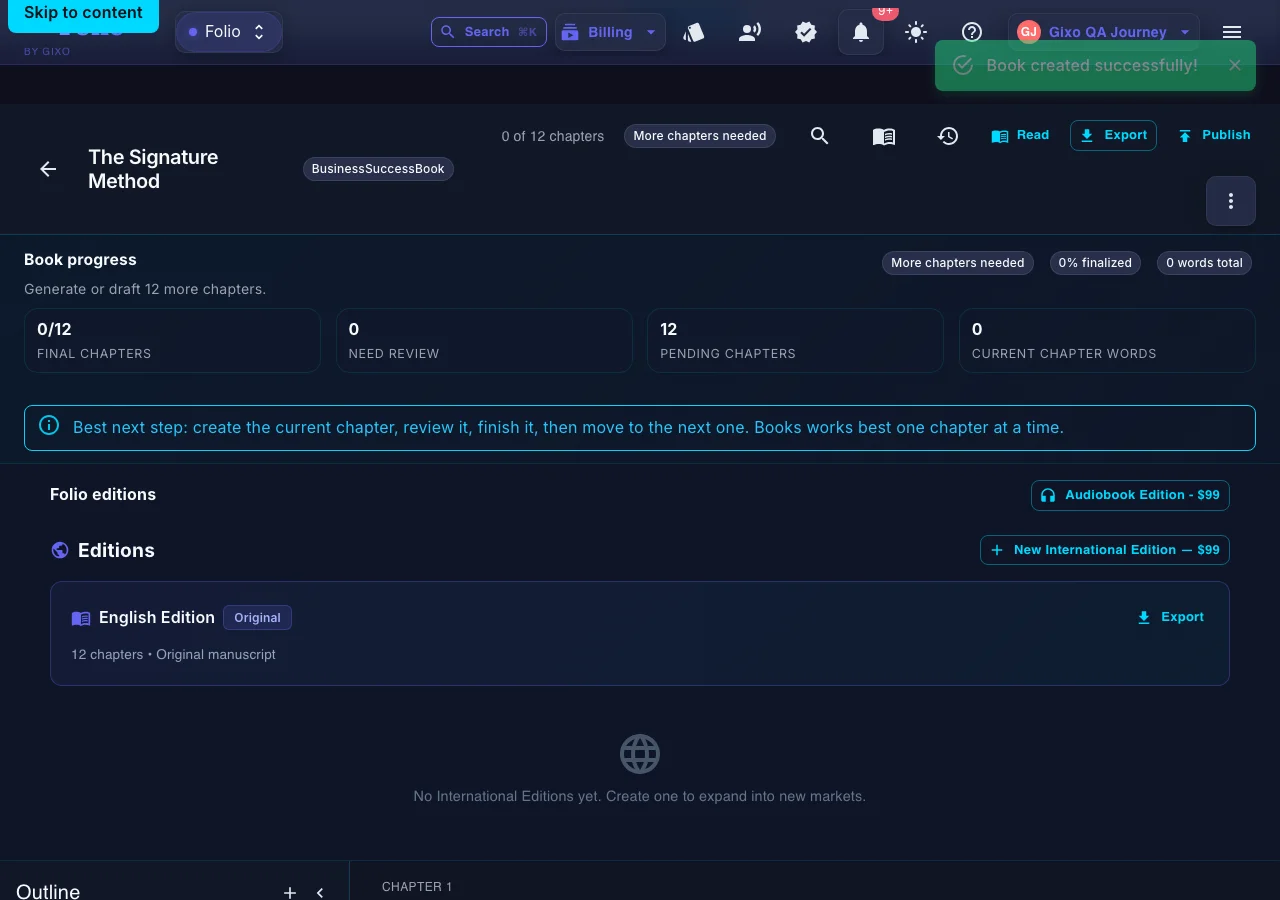
Gixo Folio — a real Gixo Folio book workspace showing chapter-by-chapter progress and available editions
A real Gixo Folio book workspace — chapter-by-chapter progress, plus editions and optional add-ons like an international or audiobook edition.
01Brief the book
02Shape the outline
03Draft chapters
04Review the manuscript
05Export the edition
Folio is a strong fit whenThe manuscript still needs structure, revision, and a finish line.

Use the persistent book workspace when the outcome is a real guide, authority book, training manual, client asset, or exportable edition.

Consider another tool whenYou only need one narrow part of the publishing job.

If your manuscript is already finished and you only need specialist formatting or a dedicated fiction system, a focused tool may be the simpler choice.

What makes a client guide worth reading and sharing?

The book has to teach clearly and reinforce positioning at the same time.

Audience
Start from the client problem
Brief the manuscript around the exact problem, audience, and transformation the guide should address.
Positioning
Use the book to reinforce expertise
A good client guide should teach while also making your method and point of view more credible.
Structure
Organize the content into a real reader journey
Turn the guide into a chapter sequence instead of a collection of disconnected tips.
Revision
Refine with examples and use cases
Use AI for speed, then revise with stories, examples, frameworks, and client-specific clarity.
Delivery
Export the guide where it needs to live
Use PDF or EPUB when it is time to deliver the final client asset.
Expansion
Create more editions when the source guide is stable
Later localized editions across 89 locale variants become easier when the original guide is well structured.

What is the workflow for creating a client guide or lead eBook?

The manuscript should behave like an asset, not a content experiment.

1
Define the client problem
Be specific about what this guide helps the reader solve.
2
Map the guide structure
Build the chapter plan around the sequence in which the reader should understand the problem and solution.
3
Draft and strengthen the asset
Generate quickly, then revise for clarity, trust, and practical usefulness.
4
Review and export
Read the guide as the end user, then export the final version for delivery or distribution.

How does Gixo Folio compare to a generic eBook generator or eBook maker?

The better choice depends on whether the guide needs a real manuscript workflow.

Decision areaGixo FolioGeneric eBook generator
Starting pointClient problem and book briefTopic prompt
StructureChapter-by-chapter manuscript planOften lighter or flatter
ReviewReview and finalize in the workspace before exportUsually thin
DeliveryExport from the same workspace (EPUB, editable DOCX, chapter PDF, HTML, Markdown, SCORM)Often requires extra steps
Best forConsultants, agencies, coaches, service businessesQuick lead magnet drafts
PlanFolio Author monthly plan, cancel between client engagementsVaries by tool
Why client guides need more discipline
They represent the business

A client guide or lead eBook is not just downloadable content. It is part of how the business teaches, sells, and reinforces trust. That means the structure, examples, and chapter sequence need to feel intentional.

A generic generator often gets you started but not necessarily finished.

Why Gixo Folio is a strong fit
The guide can be planned, reviewed, and delivered inside one workflow

Gixo Folio lets you brief the asset, build the chapter path, draft quickly, revise for proof and usefulness, review the full manuscript, and export the final guide from the same place.

That makes it more useful than treating the guide as a short-lived one-off content experiment.

Frequently Asked Questions

Can I use Gixo Folio for a client guide instead of a full book?
Yes. It works well for structured client guides, lead eBooks, onboarding books, and educational service-business assets.
What kinds of businesses fit this use case?
Consultants, agencies, coaches, advisors, service businesses, and educators are the best fit.
Can I export the guide as PDF or EPUB?
Yes. Gixo Folio supports PDF and EPUB alongside HTML, Markdown, and SCORM.
Can the guide be localized later?
Yes. After the source version is complete, you can create editions across 89 locale variants.
What is a client guide or eBook generator?
It's software that turns a client-facing problem into a structured manuscript — briefed around the specific audience and transformation, planned chapter by chapter, drafted, revised, reviewed, and exported as a finished asset (PDF or EPUB) — rather than a single AI-generated draft from a topic prompt.
How is Gixo Folio different from using Canva or a generic ebook maker for a client guide?
Generic ebook makers and design tools like Canva start from a topic or template and are typically used for layout and design. Gixo Folio starts from a client problem and book brief, builds a chapter-by-chapter manuscript plan, and keeps drafting, revision, review, and export (EPUB, editable DOCX, chapter PDF, HTML, Markdown, SCORM) inside one workflow, which is the better fit when the guide needs to reinforce a service business's expertise rather than just look designed.
Need a client guide workflow instead of a one-shot generator?
Use the Books pricing page if the client guide or lead eBook is a real project, or review the guide to see how the workflow handles planning, review, and export.