Skip to content
Sign In Try Free
Workflow-specific products Content, decks, briefs, proposals, legal, and sales each have a clearer buying path.
Review before delivery Draft, edit, collaborate, approve, and export in the same workspace.
Security + procurement path Security policy, support, and Azure Marketplace buying are public.

Draft an RFP Response Map for Review

Draft an RFP response map from the solicitation and evidence you supply. Organize requirement references, proposed responses, proof points, gaps and review notes in an editable Business brief. Check the full RFP for omissions; use Gixo Arc when you need operational requirement ownership, response review and proposal delivery controls.

Map Your RFP Response View pricing

An AI RFP response map generator drafts a planning document that links the requirements you supply to proposed responses, evidence and open gaps. In Business, comparison tables and checklists are editable brief content: owner names, dates and statuses are entries your team reviews, rather than an operational assignment or submission system. Uploaded-file citation support depends on the reviewed plan and evidence policy. Compare the completed map with the original solicitation, amendments and required forms before using it.

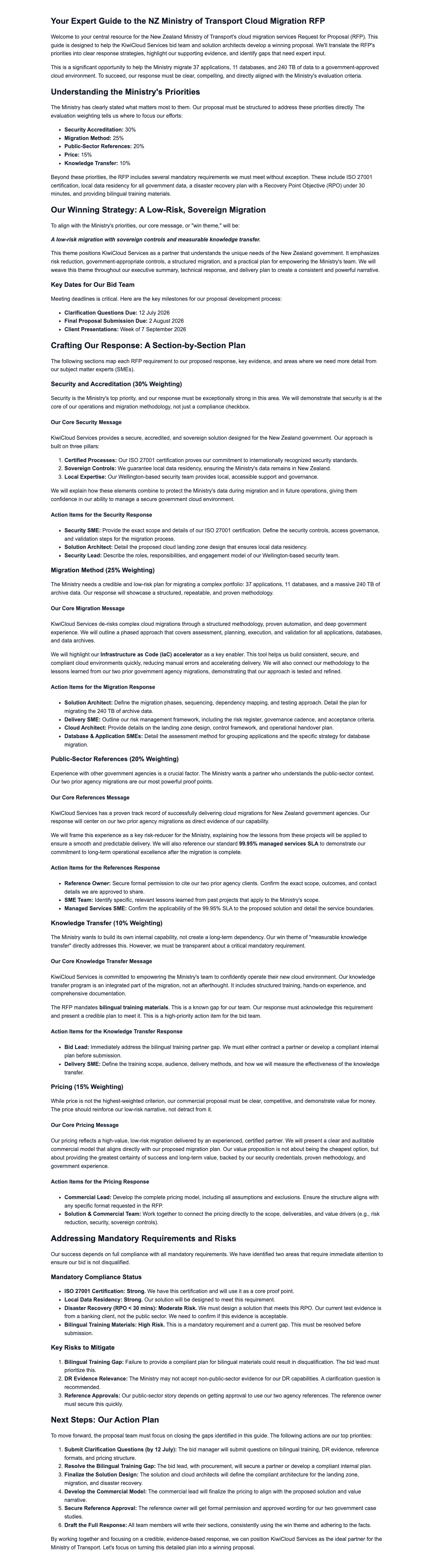
Gixo Business workspace showing a real Business Brief — an RFP response map for a government cloud opportunity
A real Gixo Business workspace — a Business Brief — an RFP response map for a government cloud opportunity. Generated from uploaded source material for review, not a final or certified recommendation.
6+Stage Pipeline
ReviewRequirement Coverage
20+Semantic Blocks
[1],[2]Auto Citations

What Makes an RFP Response Map Different From a Template?

Build a reviewable map of supplied requirements, proposed answers, evidence and open questions. Use it to plan the bid; confirm the status and completeness of each entry with the people responsible for the response.

Requirement Matrix

Ask for a comparison table with the original requirement reference, proposed response, supporting source and an open or reviewed status. Check extraction and interpretations against the complete solicitation; a generated table can omit a requirement or overstate compliance.

Proof Points Library

Supply the case studies, certifications and past-performance records that support the proposed answer. Where the evidence policy requests citations, the model can place numbered uploaded-file markers. Review omitted markers and whether the source supports the adjacent response; Business does not create a reusable RFP answer library.

Gap Analysis

Surface unmet requirements, partial compliance areas, and mitigation strategies. The AI renders gaps in Pros/Cons blocks with severity ratings so your team can decide whether to address, partner, or acknowledge each shortfall.

Owner Assignment

Record proposed section owners, due dates and review notes in the brief. Your team updates these entries manually. For operational owner assignments and response-review controls, continue in Gixo Arc with Arc access.

Submission Readiness

Keep a checklist of technical, pricing, legal and formatting checks with the status your team supplies. A percentage written in a brief is not a live submission-readiness calculation. Review the solicitation, required attachments and unresolved gaps before signing off.

Win Theme Alignment

Align differentiators, competitive advantages, and value propositions to each section of the response. The AI identifies where to emphasize your unique strengths so evaluators see a cohesive, compelling narrative throughout the proposal.

How to Map Your RFP Response

1
Upload or describe the RFP

Upload the solicitation, paste requirements or describe the opportunity. Review extracted references and requested sections against the full RFP before generating the map.

2
AI maps the response structure

Business can draft a response-map brief from the solicitation material and reviewed outline, with proposed requirement rows, evidence gaps and response themes. Source-number reconciliation and citation markers are review aids, not an exhaustive requirements or compliance assessment. Check the full RFP and amendments with the bid team, and use Arc for the operational proposal response and delivery workflow.

3
Assign owners and proof points

Use the block editor to record proposed owners, evidence references, dates and review notes. Quick AI and Power Edit revise selected passages; recheck changed facts and citations before sharing.

4
Track readiness and export

Review the map with the bid team and check it against the solicitation and amendments. Save the planning brief and export it after review. Use Arc for the operational proposal response, review and delivery workflow.

How Does Gixo Compare to Loopio, Responsive (formerly RFPIO), and Qvidian?

Compare Gixo's AI-generated response maps with dedicated RFP platforms and manual approaches.

Evaluation areaGixo BusinessWhat to check in Loopio, Responsive (formerly RFPIO), Qvidian and spreadsheets
Response jobDraft a requirement-to-response planning map from supplied sources.Test intake, answer reuse and response-review workflow on your actual solicitation.
Owners and statusRecord names, dates and statuses as editable brief content; operational controls belong to Arc.Check assignment, notification, review and readiness controls in the product and plan you evaluate.
Requirement coverageReview extracted requirements against the full RFP and amendments.Check that omitted questions, required forms and changed buyer instructions are visible.
EvidenceReview uploaded-file citation markers and the supporting proof.Inspect whether reused answers retain approved sources and what changes require review.
SubmissionExport the reviewed planning brief; Business does not submit or certify a bid.Test the buyer-required output format and the final completeness and approval process.

Frequently Asked Questions About AI RFP Response Maps

Can I upload an actual RFP document?
Yes. Supply the RFP as source material, or paste the requirements and solicitation details. Review the proposed outline and the extracted references before drafting. The response map is editable planning content, so check the full document, amendments and required forms for anything the draft omitted.
How does the gap analysis work?
The draft can compare supplied requirements with the capabilities and proof you describe, then organize possible gaps and proposed mitigations. Review each status against the original wording and evidence. It does not certify compliance or guarantee that every requirement or gap was detected.
Can I assign section owners?
You can write owner names, due dates and review notes in the response map and keep them up to date with your team. These are entries in the Business brief, not operational assignments or notifications. Use Gixo Arc with Arc access when the response needs requirement ownership and review controls.
How do I track submission readiness?
Keep a reviewed checklist in the map and update its statuses from the bid team. Business does not compute a live bid-readiness percentage or confirm the required forms and attachments are complete. Check the full solicitation and amendments; use Arc for the operational response-review workflow.
Is this for sales teams or bid managers?
Both can use the map to plan proposed answers, proof points, owners and open questions. It is a Business planning brief. A team that needs operational requirement ownership, response review and tracked proposal delivery should use Gixo Arc with Arc access.
What is an AI RFP response map generator?
It drafts a planning document that connects supplied requirement references with proposed answers, proof points and open gaps. In Business, the matrix and checklists are editable brief content. Review requirement coverage and citations against the original RFP and sources before using the map. Operational response ownership, review and delivery belong to Gixo Arc.
What is a requirement matrix in an RFP response?
A requirement matrix links a solicitation reference to the proposed response, supporting proof, review status and open gap. The goal is complete coverage, but a generated draft needs comparison with the full RFP and amendments. Business can format the reviewed matrix inside a brief; it does not certify compliance or completeness.

Map Your RFP Response

Prepare an RFP response-map draft from the solicitation evidence and reviewed outline. Check proposed requirement rows, source references and gaps against the full RFP and amendments with the bid team before using the map.

View pricing

Updated