Sign In Try Free
Workflow-specific products Content, decks, briefs, proposals, legal, and sales each have a clearer buying path.
Review before delivery Draft, edit, collaborate, approve, and export in the same workspace.
Security + procurement path Security policy, support, and Azure Marketplace buying are public.

AI Swimlane Flowchart Maker

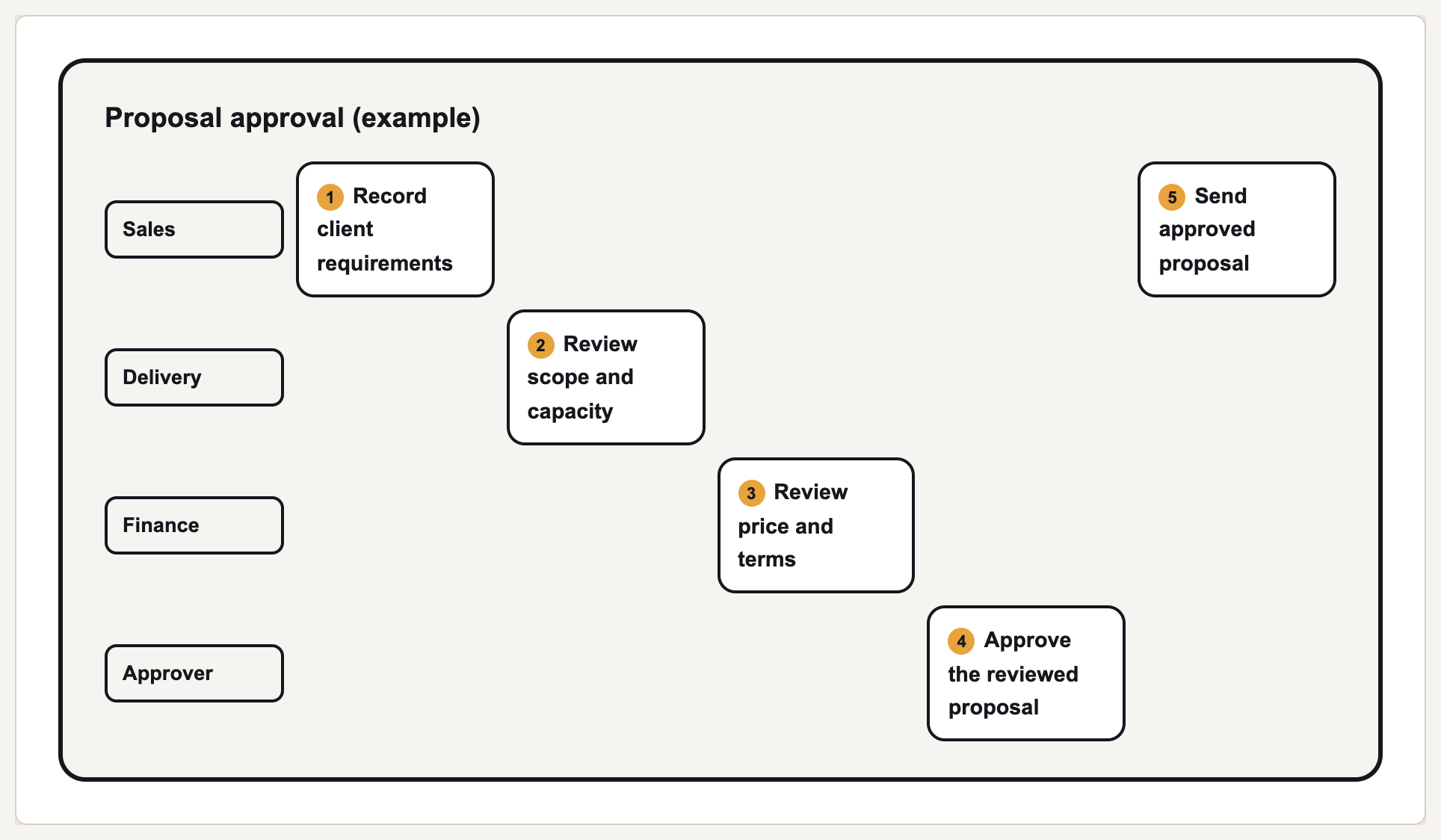
A swimlane flowchart shows who owns each step when a process crosses teams, roles, or systems. Describe the hand-off in plain text and Gixo Prism's swimlane flowchart maker lays out the lanes and steps deterministically — exact labels, no garbled AI image, ready to put in front of the people who run the process.

Start free — 14-day trial Open the flowchart maker

A swimlane flowchart (also called a cross-functional flowchart) breaks a process into named lanes — one per team, role, or system — and places each step in the lane responsible for it, so a hand-off is visible at a glance instead of buried in a plain decision tree. Gixo Prism's swimlane flowchart maker turns a list of steps and owners into that lanes-and-steps layout deterministically: no AI image model in the loop, so labels never garble and lanes never merge or drop. Apply your brand palette and export as clean HTML/SVG.

2 Flowchart modes
Exact Every lane and label
0 AI image model in the loop
On-brand Palette-governed

What makes a good AI swimlane flowchart maker?

Prism's swimlane mode lays out named lanes and their steps deterministically, so a cross-team process reads clearly and stays exact.

Named lanes for teams, roles, or systems

Give each lane an owner — a team, a role, or a system — and Prism places every step in the lane responsible for it, so ownership is never ambiguous.

Cross-team hand-off clarity

The moment a step crosses from one lane to the next is visible at a glance — exactly where a plain flowchart or a written SOP tends to hide the hand-off.

Deterministic, exact output

No AI image model in the loop. The same lanes and steps always produce the same layout — no garbled labels, no merged lanes, no invented steps.

Brand-palette governance

Your brand palette applies to lanes, steps, and connectors automatically, so the swimlane matches the rest of your deck or doc without manual styling.

Editable, then clean export

Rename a lane, move a step, or reorder the flow and it re-renders exactly. Export as clean, self-contained HTML/SVG.

Decision flows too

When you don't need lanes — just branching yes/no logic — Prism's flowchart maker has a decision-flow mode for that too, in the same workspace.

How do you make a swimlane flowchart with AI?

From a plain-text list of steps and owners to a finished, on-brand swimlane in four steps.

1
Describe the process and who owns each step

List the steps in your process and, for each one, the team, role, or system responsible — for example, "Customer signs order form," "Finance verifies credit," "Ops ships the order."

2
Prism lays out the lanes and steps

Each owner becomes its own named lane, and every step is placed in the lane responsible for it — deterministically, with exact labels.

3
Apply your theme

Choose a theme preset — conservative, bold, brand-conservative, or brand-bold — or apply your Brand Kit so the swimlane matches the rest of your deck or doc.

4
Export as HTML/SVG

Take the finished swimlane as clean, self-contained HTML/SVG into your deck, doc, or page.

Sample input: Loan application approval — Customer: "Submits application." Loan Officer: "Reviews documents," "Requests missing paperwork." Underwriting: "Runs credit check," "Approves or denies." Customer: "Receives decision."

Prism turns that into a lane per owner — Customer, Loan Officer, Underwriting — with each step placed in its lane and the hand-offs between them visible, exactly as described.

Frequently Asked Questions

What is a swimlane flowchart?
A swimlane flowchart (also called a cross-functional flowchart) breaks a process into named lanes — one per team, role, or system — and places each step in the lane responsible for it. It's the standard way to show a process that crosses team boundaries, so ownership and hand-offs are visible at a glance instead of buried in a plain flow.
What's the best AI swimlane maker?
Gixo Prism, if the lanes and labels have to stay exact. Its flowchart maker's swimlane mode takes a list of steps and owners and lays out the lanes deterministically — no AI image model in the loop — so a lane is never merged, dropped, or mislabeled.
How is a swimlane different from a plain flowchart?
A plain flowchart (decision flow) shows branching yes/no logic — questions, branches, outcomes — without assigning ownership. A swimlane adds named lanes on top of the steps, so you can see which team, role, or system is responsible for each one. Use a decision flow for logic; use a swimlane when responsibility crosses boundaries.
What other flowchart types does Prism support?
Prism's flowchart maker has two modes: swimlane, for cross-team or cross-role processes, and decision flow, for branching yes/no logic. Both are laid out deterministically from the text or steps you provide.
Can I use this for incident response, onboarding, or approval workflows?
Yes — those are exactly the processes swimlanes are built for. Incident response (who's paged, who triages, who resolves), onboarding (HR, IT, manager, new hire), and approval workflows (requester, reviewer, approver) all cross roles or teams, which is what a swimlane is for.
What formats can I export?
The swimlane flowchart maker exports clean, self-contained HTML/SVG you can drop into a deck, doc, or page. Maker visuals don't export as PDF or PPTX.
Do I need an account?
Yes. The swimlane flowchart maker runs inside Gixo Prism — start a 14-day free trial with no credit card.
How much does it cost?
There's a 14-day free trial with no credit card. After that, Gixo Prism is $19/month with everything included.
Can I edit the swimlane after generating it?
Yes. Rename a lane, move a step to a different owner, reorder the flow, or change the theme, and the maker re-renders exactly, with no loss of fidelity.

Map the process where responsibility crosses teams

Describe who owns each step and get a swimlane flowchart with exact lanes and labels, on your brand.

Start free — 14-day trial Open the flowchart maker