
Make the intake specific
Supply the parties, document kind, jurisdiction, obligations, dates and reference material. Review imported content and retain its source identity before using it in a new matter.
Risk register products differ: some assemble draft entries or suggest scores, while others focus on the ongoing risk workflow. Gixo generates a structured risk register draft — risks, likelihood and impact, suggested owners, and mitigation notes — that your team then edits, scores, and exports for governance review.
Risk register software is a tool for building and maintaining a risk register — a structured list of the risks facing a business unit, project, or control domain, with each risk carrying a category, likelihood and impact rating, an owner, and mitigation notes. Gixo is document-drafting software in this category: it generates a structured risk register draft from the context you provide, with scoring fields and mitigation and evidence placeholders left visible, and exports it as a reviewer-ready artifact. It is not a continuous risk-monitoring platform — owner routing, escalation, alerting, and live dashboards remain a separate system decision, and every risk, score, and owner in the draft is reviewed and adjusted by your team before it counts.
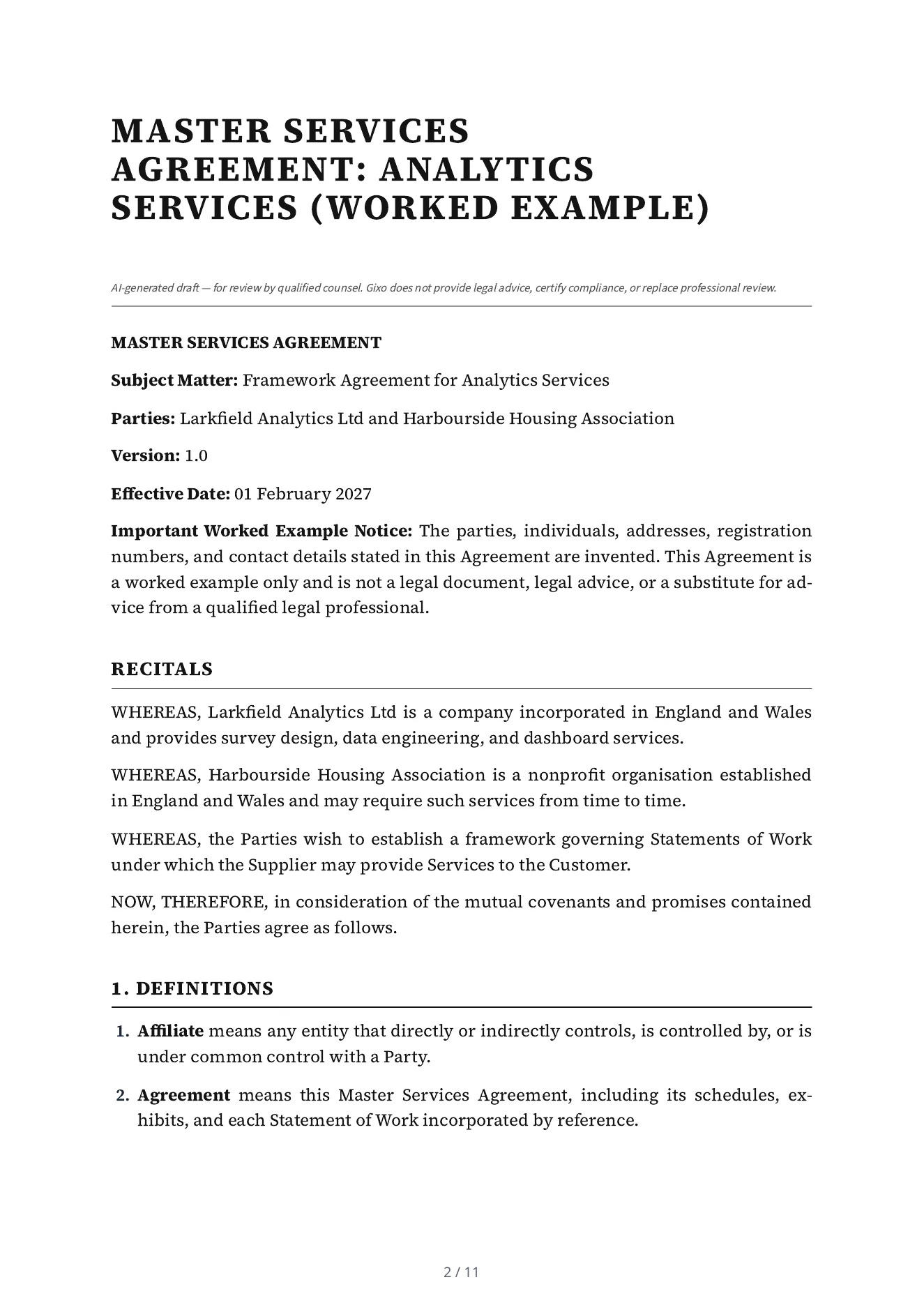
This is a real Lex export for invented parties. Inspect the input and clauses as a worked example, with professional review kept separate from automated drafting and checks.
A master services agreement of 17 numbered parts: definitions, scope of services, service levels and change orders, fees, intellectual property, confidentiality, data protection, warranties, indemnification, limitation of liability, force majeure, term and termination, transition assistance, governing law, general provisions and schedules. Its first page says it is a worked example, not a legal document.
Draft a Master Services Agreement: analytics services between Larkfield Analytics Ltd (Supplier) and Harbourside Housing Association (Customer). Governing law: England and Wales. Effective date: 2027-02-01. Term: Two years from the effective date, renewable by written agreement. Confidentiality: Five years after the agreement ends. The Supplier provides survey design, data engineering and dashboard services to the Customer under statements of work agreed in writing. Excluded: any service not set out in a signed statement of work. Dependencies: the Customer provides access to its systems and a named contact for each statement of work. State on the first page that the parties, people and addresses in this agreement are invented and that it is a worked example, not a legal document. The notice email address of Larkfield Analytics Ltd is notices@larkfield-analytics.example and of Harbourside Housing Association is notices@harbourside-housing.example (both invented).
Read mechanically against the intake, not by a lawyer: 10 of the 12 facts the intake gave are in the draft (the two registration numbers are not printed), nothing is left as a placeholder, and it states two terms the intake did not give, 30 days and 10 Business Days, which Lex chose.
Supply the parties, document kind, jurisdiction, obligations, dates and reference material. Review imported content and retain its source identity before using it in a new matter.
Use the legal workspace's permitted structural tools, Draft Checks and review paths. Compare proposed changes with the saved draft and original material; unsupported Word edits must be handled explicitly.
Have qualified counsel review enforceability, local requirements and the actual commercial intent. Check the current approval state and the downloaded document after a change.
Select the target clause and give Ask Lex a bounded instruction. Missing facts remain visible for review. Inspect the before-and-after proposal, required clause checks and any explicit outside-matrix or mandatory-clause override before versioned application. Use the legal workspace's structural allowlist rather than assuming every general content-editor block is available.
Inspect immutable playbook versions, anchored findings, provenance and precedent variants before staging a change. Matters retain original sources, quotation findings and source-version comparisons. Review extracted obligations for timing, ownership and source revision; negotiation turns and agreement-pack review cells have their own decisions and current-version requirements.
Original-format Word export, tracked changes against an original and saved-version redlines are separate paths. Unsupported edits must be surfaced rather than silently claimed as preserved. Inspect the layout, validator notes and downloaded file, then retain its delivery receipt. Counsel's review applies to the actual matter and version.
Lex does not provide legal advice or certify compliance. The public specimen is not a universally reusable legal template. Word fidelity depends on the supported original-document and saved-version path; unrestricted Power Edit and image insertion are not legal editing features.
A useful register captures the same fields every time and keeps unresolved items visible. Here is what Gixo prepares in the draft, and where a dedicated risk-operations platform still owns the job.
Draft rows across operational, financial, strategic, regulatory, cybersecurity, or custom categories, based on the scope and context your team provides.
Capture likelihood, impact, inherent risk, and residual risk in a consistent structure that reviewers can adjust to your organization's scoring model.
Record planned controls, mitigation text, and open questions in each row without implying the tool is tracking remediation in real time.
Note the responsible team or owner inside the register so accountability is written down. Gixo is not an owner-routing, assignment, or escalation engine.
Leave gaps where supporting evidence or a control reference is still missing, so reviewers can see exactly what needs attention rather than a smoothed-over grid.
Export the register as PDF, DOCX, HTML, and TXT so it stays usable in a board pack, audit file, or spreadsheet outside the workspace.
Name the business unit, project, or control domain you are registering risks for, then choose the categories that fit — operational, cyber, regulatory, financial, or your own.
Gixo drafts structured rows with risk descriptions, categories, likelihood and impact fields, mitigation notes, owner context, and evidence placeholders.
Adjust the ratings, assign real owners, refine mitigations, and confirm or remove drafted risks — leaving missing evidence and uncertain facts visible for follow-up.
Export for governance or audit review. To refresh the register next period, regenerate a draft from updated context and reconcile it against the reviewed version.
"Risk register software" covers two different jobs: drafting the register artifact and running the ongoing risk workflow. Gixo focuses on preparing a reviewable register document. Platforms such as LogicGate and Resolver support ongoing risk workflows and can also help prepare entries or assessments; compare the relevant drafting and operational controls in your pilot.
| Capability | Gixo | GRC platforms (LogicGate, Resolver) | Spreadsheets |
|---|---|---|---|
| Main job | Drafts the register artifact | Ongoing risk workflow platform | Manual tracking |
| Initial register structure | Generated from context | Configured workflow | Built by hand |
| Likelihood and impact scoring | Built into the draft | Yes | Manual formulas |
| Missing-evidence handling | Leaves gaps visible | Check evidence and gap handling in the selected product and configuration | Manual |
| Owner routing and escalation | Not included | Yes | Manual |
| Live dashboards and alerts | Not included | Yes | No |
| Reviewer-ready export | PDF, DOCX, HTML, and TXT | Reports | Print or export |
Gixo helps prepare regulated work. It does not provide legal advice, certify compliance, or replace professional review.
Official information checked 10 October 2026: LogicGate describes risk-intake/assessment assistance alongside mitigation records and workflows; Resolver describes integrated risk, control effectiveness, action and analytics. Compare current draft assistance, scoring and operational controls with a safe register task; the table is not a claim that those products lack AI or document generation.
Updated