
Plan the reading order
Supply the audience, decision, source material and required coverage. Review the outline before generating. For a QBR, keep results, variance, risks and next decisions distinct instead of mixing them into a status collage.
A quarterly business review has two jobs: honestly review the quarter against the goals you set, and commit to the plan for the next one. Its power is the quarter-over-quarter rhythm, so a consistent structure matters more here than anywhere. Below is the slide-by-slide QBR template — for internal team reviews and customer-success QBRs alike — plus how to build it fast in Gixo Lumen.
A QBR template should distinguish the period’s results from the reasons for variance and the decisions needed next. Build the slide sequence around the review conversation rather than using one repeated layout for every metric.
| Part | Worked detail |
|---|---|
| 1. Review frame | Period, audience, agreed objectives and the decisions this meeting can make. |
| 2. Results | Actual versus target, consistent units and a readable source table. |
| 3. Variance | The largest changes, their supplied evidence and explanations still needing validation. |
| 4. Risks and response | Owner, dependency, proposed action and next review point. |
| 5. Next-period decision | Specific approval or trade-off, the options and the consequences of deferral. |
Keep an unsupported explanation visibly unresolved; do not turn correlation into a cause. Read the actual deck export and speaker notes. The related executive briefing above demonstrates a real Lumen output; it is not represented as a generated QBR with measured company results.
A worked workflow
Follow the verified Northwind Operations Q4 refresh below. The existing Q3 sample was copied, updated with explicitly fictional next-period inputs, saved, reloaded and exported from Lumen. The original Q3 deck was kept unchanged.
This six-slide Lumen deck uses presenter-authored fictional figures. Q4 revenue is USD 1,150k: USD 30k above Q3, but USD 50k below the USD 1,200k plan. The service mix is 550/420/180, and on-time completion is 94% against a 95% target. The corrected Q4 chart label was saved and confirmed after a hard reload, then checked in fresh HTML, PDF and PowerPoint exports.
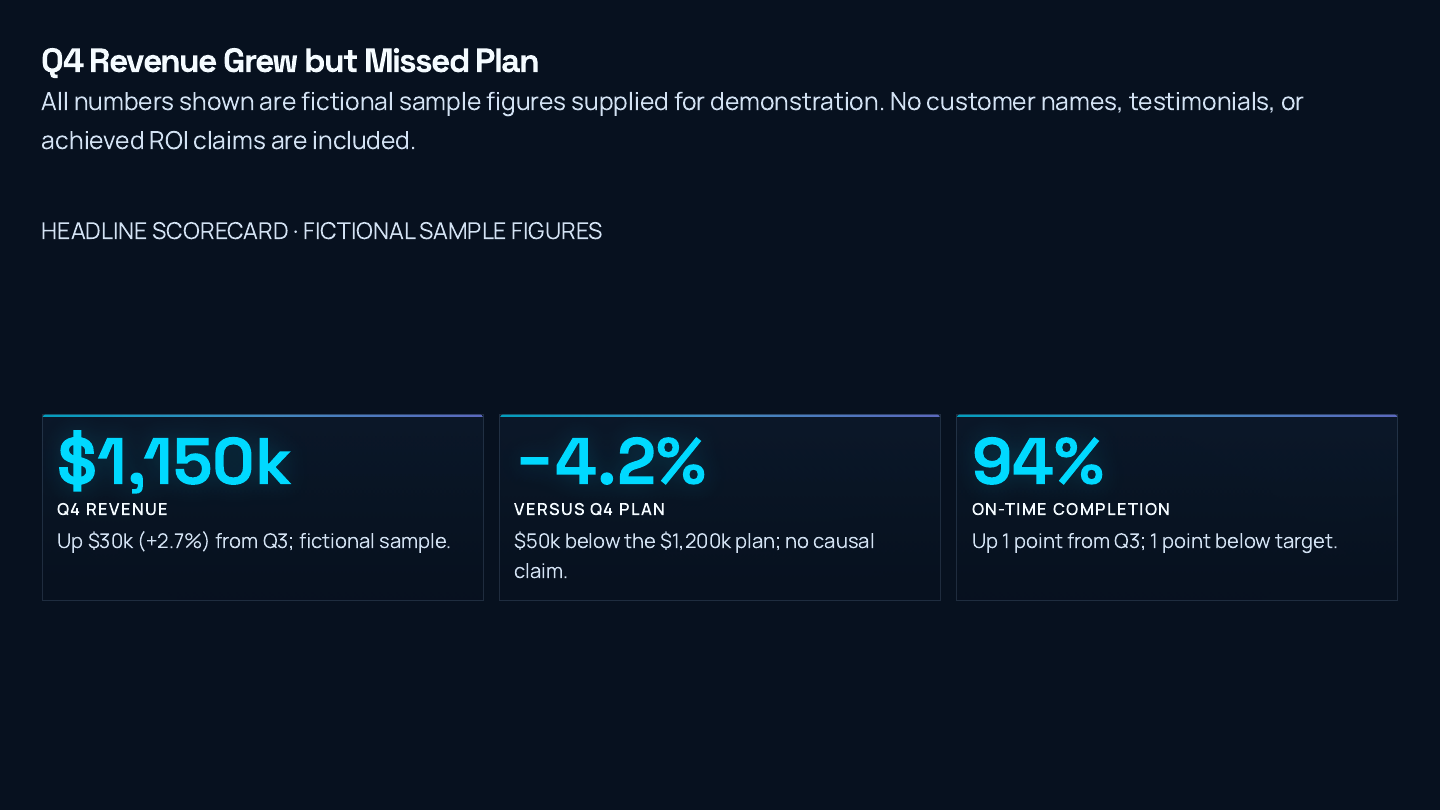
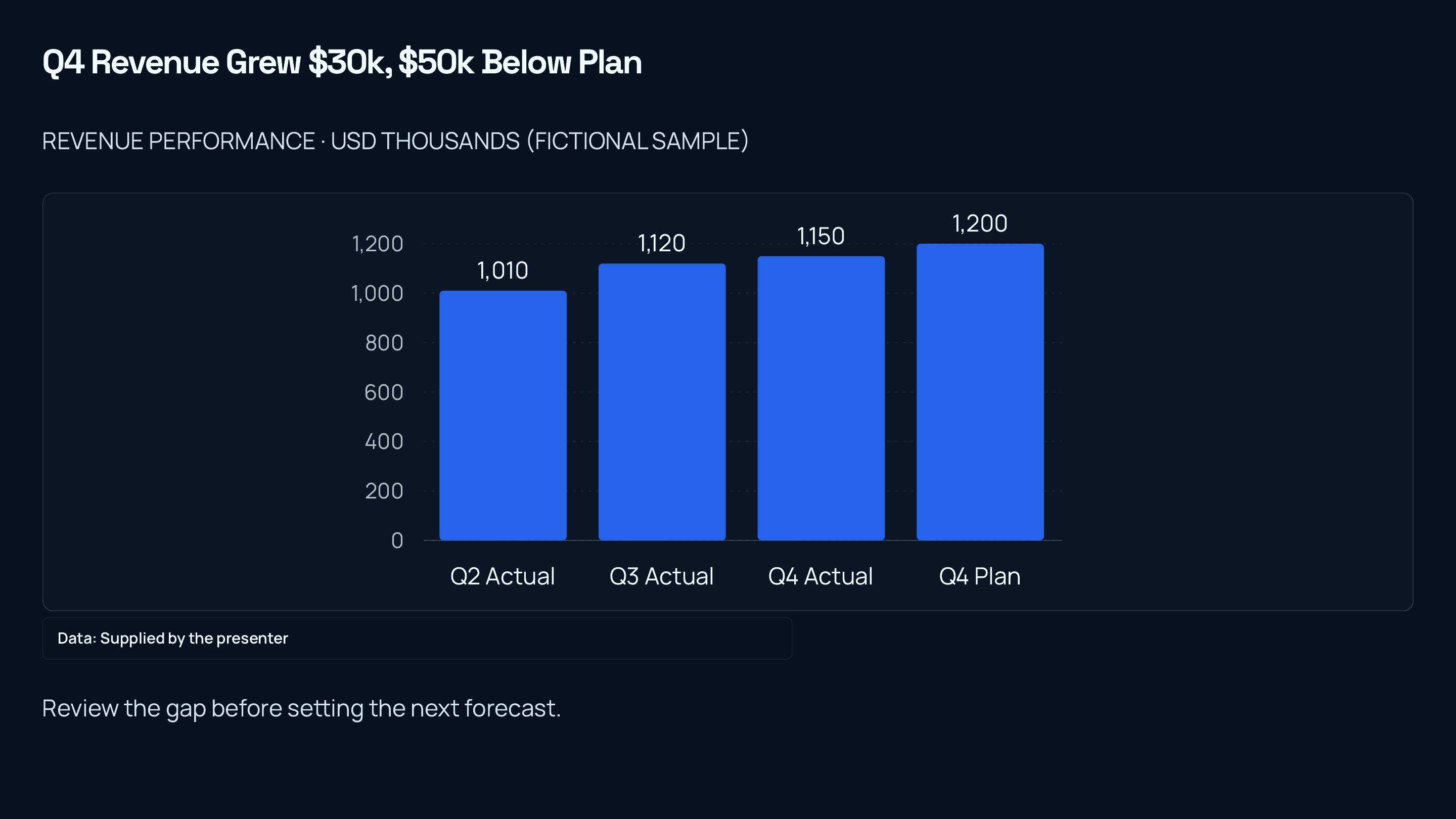
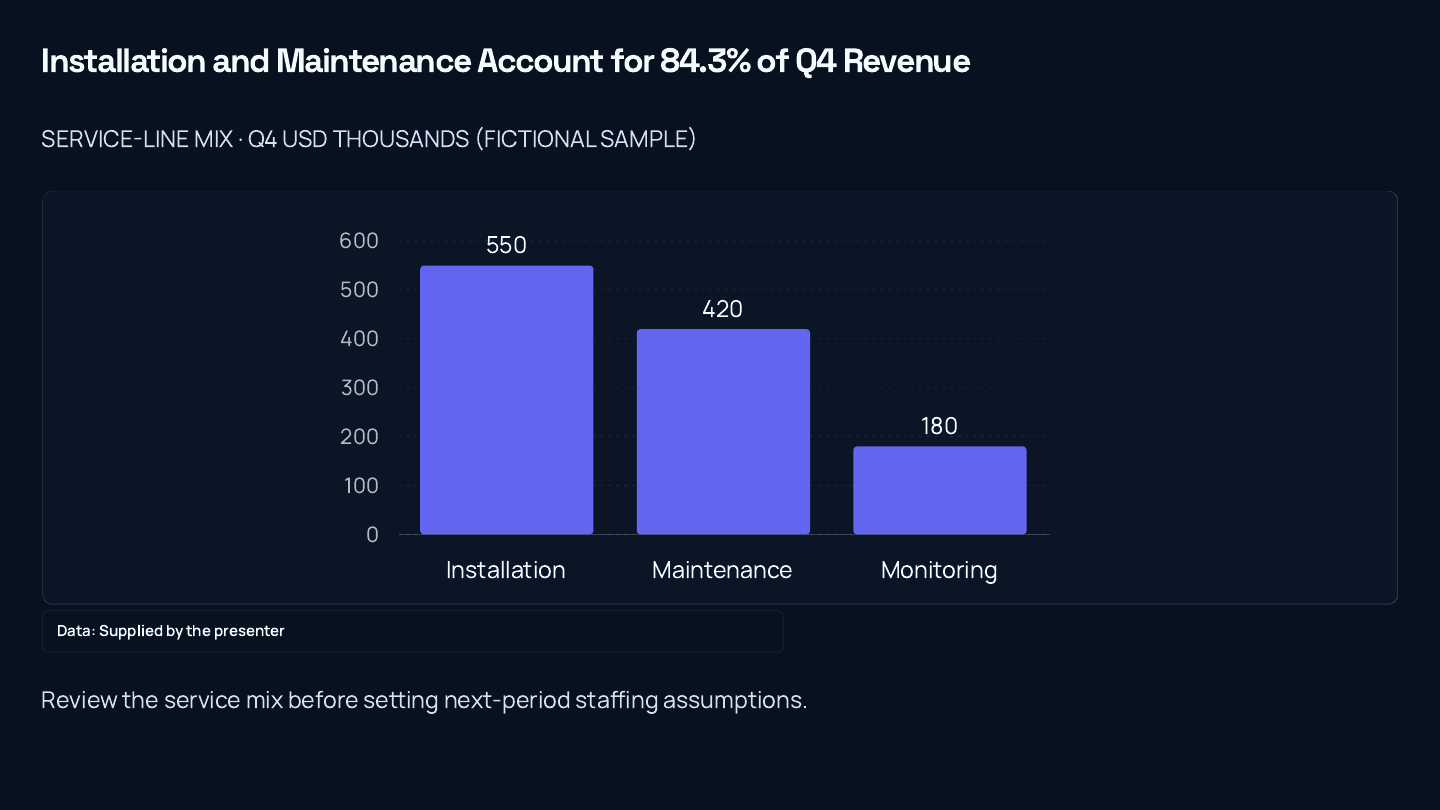
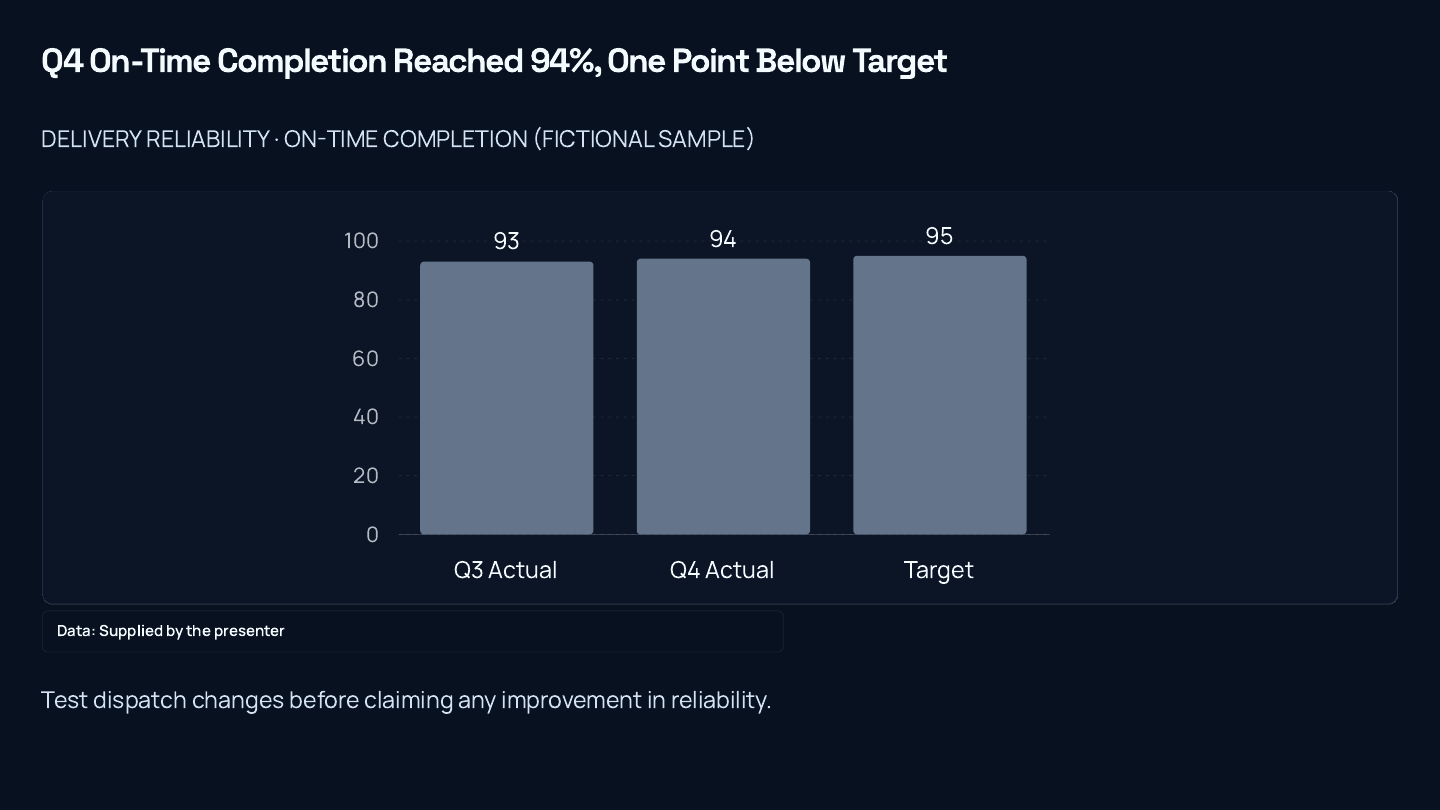
All figures are fictional supplied inputs, not customer results. These previews are pages of the actual exported PDF, not recreated charts. PowerPoint contains five editable slides and one image-based closing slide; all three charts have native chart parts and embedded spreadsheets. The closing slide retains a text-density finding and explicitly historical Q3 actions alongside separate Q1 assumptions. Inspect the review notes before reuse; this is not a fully resolved operational plan.
Keep the original deck, then update the copy's cover, scorecard, speaker notes and period-specific wording.
Inspect: A Q4 figure can be above Q3 and below the Q4 plan at the same time. USD 30k growth is not evidence that the plan was met.
Inspect the spreadsheet comparison and apply the intended revenue, service-mix and reliability values. Keep units, source notes and saved series colors with the data.
Inspect: The service mix totals USD 1,150k. Installation plus maintenance is 970/1150, or 84.3% rounded.
Use the chart slide's All fields panel to replace the existing chart label with Q4. Leave the field with Tab, save, then reload and check the rendered slide.
Inspect: The retained production check cleared and retyped the field before a hard reload. Blank preserves the saved label; it does not remove it.
Open the HTML deck, six-page PDF and PowerPoint below. Read the planning slide and its speaker notes as well as the charts.
Inspect: All three charts have native PowerPoint parts and embedded spreadsheets. The closing slide is image-based, retains historical Q3 actions and still has a density finding; no AI density change was applied.
Verified fictional refresh, not observed company performance. These files demonstrate saved edits and actual exports. Desktop and mobile viewport review does not establish physical-device or Microsoft PowerPoint application compatibility.
Lumen · inspectable review specimen
A QBR deck should connect each conclusion to a defined period, source number and decision. Refresh the source table first, then review titles, charts and notes before exporting the next edition.
Authored fictional instructional sample. The downloadable Word file is rendered through Gixo’s real document exporter. This is separate from the captured product workflows on this page.
The actual captured Northwind QBR uses fictional supplied revenue of 920, 1,010 and 1,120 USD thousands in Q1–Q3, with Q3 plan of 1,080. Q3 mix is installation 560, maintenance 390 and monitoring 170; these sum to 1,120. On-time completion is 93% against 95%, a shortfall of two percentage points, not two percent.
| Slide job | Source check | Reviewer decision |
|---|---|---|
| Revenue scorecard | 1,120 − 1,080 = 40; 40 ÷ 1,080 ≈ 3.7% | Use variance to plan; do not infer a cause |
| Revenue mix | 560 + 390 + 170 = 1,120 | Use parts of the same Q3 total |
| Operating risk | 93% versus 95% target | Assign a review of the two-point gap |
| Board decision | Approved source pack and assumptions | State the requested decision, owner and next review |
Keep the Q3 source and exported deck. For a later quarter, provide a new dated table, confirm whether the metric definition changed and review the proposed slide changes. Check that a title, note or narrative still refers to the correct period. A number refresh is not demonstrated by relabelling Q3 as Q4.
Open the retained actual six-slide PowerPoint beside its supplied source pack. Editable text, charts, pictures and flattened artwork are different object types. The withheld original QBR PDF is not replaced here by a separately rendered Prism chart.
Review instructions are authored; the linked QBR deck and source pack are retained product artifacts. No new Ask Lumen, next-period or approved board decision run is claimed.

Open an actual exported deck, then compare its outline, source constraints and slide choices with the job you need to finish.
A 12-slide client strategy deck on where planned U.S. solar and battery storage additions concentrate in 2026, built only from two EIA articles: the national buildout, the leading states for solar and for storage, the named projects, and a recommended order of attention. It reaches its answer at the end.
A consulting-style handoff for the leadership team of an electricity business that is deciding where to look first as new solar and battery storage capacity is built; no client is named and none is described. Frame the situation, the analysis the supplied pages support, a recommendation and an action plan. Every figure must come from the supplied pages. The client's own numbers are not known, so recommend in terms of what the pages show, and use no placeholders and no made-up client metrics. Workflow: Consulting and strategy. 12 slides requested. Documents supplied as text (EIA, "Solar, battery storage to lead new U.S. generating capacity additions in 2025 (Today in Energy)", https://www.eia.gov/todayinenergy/detail.php?id=64586; EIA, "New U.S. electric generating capacity expected to reach a record high in 2026 (Today in Energy)", https://www.eia.gov/todayinenergy/detail.php?id=67205).
A separate reviewer agent read the deck’s 74 claims, slides and speaker notes, against the two EIA articles: 53 are supported, 5 loosen or go a little beyond their wording, 16 are in neither article and none contradicts one. All 16 are advice or a judgement about which market to take first, such as “Start the solar market scan in Texas.” It is not a person’s review.
Supply the audience, decision, source material and required coverage. Review the outline before generating. For a QBR, keep results, variance, risks and next decisions distinct instead of mixing them into a status collage.
Edit structured slide fields, preview field alternatives or review a whole-slide rewrite. Ask Lumen can propose wider changes; inspect and select the changes before applying them to the saved deck.
Check charts, speaker notes, images and contrast in presentation view and the downloaded file. A new-period deck is a separate draft with changed values and sources to review.
Choose a creation mode and workflow profile, supply source material and review the planned coverage. Slide fields have layout-specific budgets. Field assistance offers alternatives with rationale and word counts; whole-slide refinement shows field-level changes. Ask Lumen can propose wider structural edits, which require a reviewed preview before application.
Paste spreadsheet rows, choose header handling and preview replacement chart data. Where offered, select Business metrics explicitly and inspect their source receipt. Review changes in values and sources before accepting a next-period draft. Theme controls cover brand colors, type, logo placement, background and contrast choices; a custom theme still needs visual review.
Inspect full-screen and audience views, speaker notes, next-slide preview, navigation and timer. Check PDF and PowerPoint separately. Supported elements can become native editable shapes or charts; complex visuals can use a flattened fallback. Speaker notes and per-slide handoff choices should be inspected in the actual file.
PowerPoint export is hybrid: supported content may remain editable while complex visuals can be flattened. Conversion between a responsive story and slides requires a preview; it is not lossless.
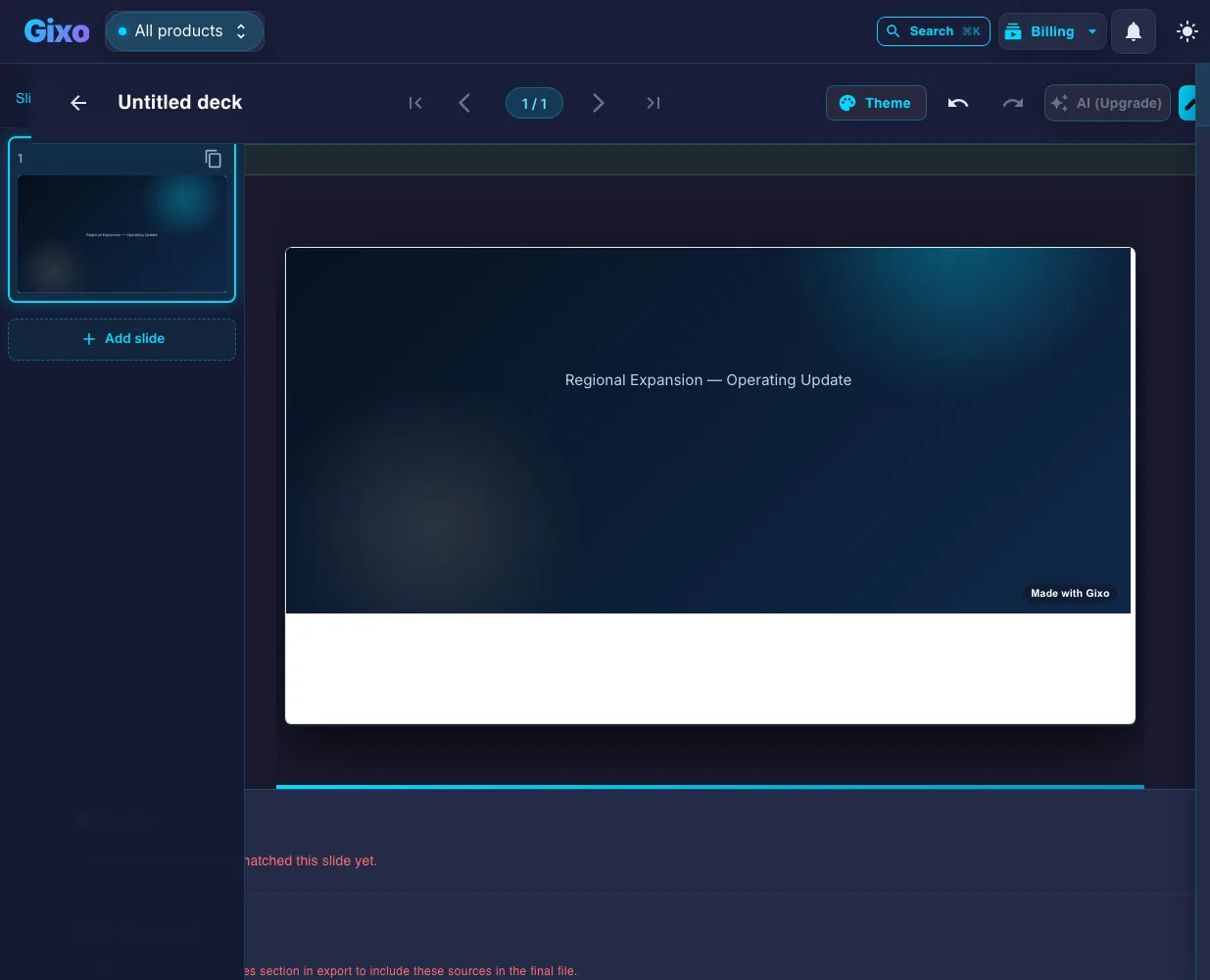
A QBR is a quarterly business review: a recurring meeting held once a quarter to review performance against the goals set last quarter, explain the gaps, and agree what changes next. In business the term covers two distinct meetings that share a format. The internal QBR is a team or department reviewing its own numbers with leadership. The customer QBR is a vendor's customer-success team reviewing delivered value with an account, usually ahead of a renewal. The deck below works for both; the difference is who is being held to account, not how the slides are ordered. (Outside business, QBR most often means a quarterback rating — not this.)
The most valuable thing about a quarterly business review is consistency. Because you run it every quarter against the same scorecard, the audience can see trajectory — are the numbers improving, are commitments being kept, is the plan working? That only holds if the structure stays the same quarter to quarter. Reinventing the deck each time destroys the comparison that makes a QBR worth holding.
Every QBR balances two halves: a backward-looking review of the quarter against goals, and a forward-looking plan for the next. The review earns credibility by being honest about misses, not just celebrating wins; the plan earns commitment by being specific about owners and outcomes. A QBR that is all review is a status report; one that is all plan ignores accountability.
The same skeleton works for an internal team QBR and a customer-success QBR — the difference is the lens. An internal QBR reviews goals and KPIs; a customer QBR reviews value delivered, adoption, and ROI, then aligns on the next quarter's success plan and any renewal or expansion. The nine-section sequence below applies to both.
A note on running the meeting itself: the deck is only half the job. Send it as a pre-read a day or two ahead so the room arrives already knowing the results, and protect the back half of the agenda for the forward-looking plan rather than letting the review of last quarter consume the whole hour. The most common way a QBR loses its value is spending fifty minutes narrating what happened and five minutes rushing the commitments for what comes next. Decide in advance how much time each section gets, and treat the next-quarter priorities as the part the meeting exists to produce. A review everyone has already read frees the live time for the decisions that actually move the next quarter.
Nine sections — half review, half plan. Keep the same scorecard every quarter.
The quarter under review, the team or account, attendees, and the agenda. State the purpose in one line so everyone knows whether this is an internal review, a customer review, or a planning session. Confirm what was committed last quarter so the room is anchored before the numbers start.
A single slide that says whether the quarter hit, missed, or beat the top goals, the one or two headlines, and the focus for next quarter. Anyone who reads only this slide should understand how the quarter went. Lead with the verdict, then spend the rest of the deck proving and planning.
The scorecard: each goal or OKR you committed to, its target, the actual result, and a clear on-track / hit / missed status. This is the accountability core of the QBR — it closes the loop on what you said you would do. Keep the exact same goals you set last quarter; do not quietly swap in easier ones.
The numbers behind the results — revenue, pipeline, retention, usage, or the metrics that matter for your function — each shown as a trend across recent quarters, not a single snapshot. Trends tell the story a point-in-time number hides. For a customer QBR, this is where adoption and product-usage data live.
Three to five wins that mattered, each with the evidence and the impact — not a laundry list of activity. Tie wins back to the goals so they read as progress, not noise. In a customer QBR, frame wins as value delivered and outcomes achieved, in the customer's own metrics.
Name what fell short, the root cause, and what you are changing. A QBR that only shows wins is not credible and forfeits the chance to learn. Treating misses as learnings — with a concrete adjustment — is what makes leadership and customers trust the review and the plan that follows.
What you learned this quarter that should shape the next: voice-of-customer themes, competitive shifts, pipeline signals, or operational bottlenecks. This bridges review and plan — it is the "so what" that justifies the priorities you are about to propose. Show the pattern, not anecdotes.
The forward half of the deck: the three to five goals for next quarter, the key initiatives behind each, owners, and target outcomes. Make them specific and measurable so the next QBR can grade them. This is the slide the room actually commits to — give it the weight it deserves.
The blockers to the plan, the resources or decisions you need, and the appendix with detailed metrics and supporting data. Be explicit about asks — a QBR is also where you secure the support next quarter requires. The appendix keeps the live deck tight while answering the deep-dive question.
Section 2 above deserves its own treatment, because it is the slide most people get wrong and the only one some of your audience will read. An executive summary slide in a QBR is not a table of contents and it is not a warm-up. It is the verdict, delivered before the evidence, so that everything after it is read as proof rather than suspense.
A working executive summary slide template for a quarterly review carries four things and nothing else. First, the verdict in one line — hit, missed, or beat, said plainly. Second, three to five headline numbers, each shown against its target or the prior quarter, because a figure without a comparison tells the room nothing. Third, the decision or support you need, with an owner and a date attached. Fourth, the single biggest risk to next quarter and what you are doing about it.
Two failure modes are worth naming. One is the summary that lists activity instead of outcomes — "ran 14 campaigns" rather than "pipeline up 22% against a 15% target." The other is the summary that only carries good news; a room that has to hunt for the miss stops trusting the deck. If you want an executive summary slide example to test yours against, apply this rule: hand the slide to someone who was not in the quarter, and see whether they can tell you how it went and what you are asking for. If they cannot, the slide is not finished.
The same slide carries over to a customer QBR with one substitution: outcomes in the customer's own metrics instead of your internal goals. The verdict, the comparison, the ask, and the risk stay exactly where they are.
Start from last quarter's numbers and goals and get a structured, editable QBR — then keep the same template every quarter so the trends read clean.
Keep decks grounded to source material and approved web research when needed. Gixo extracts key claims, highlights what needs verification, and surfaces citations, attribution, and trust status inside the deck viewer.
8 workflow profiles across consulting, finance, startup, sales, executive, product, training, and general business decks. The workflow drafts the QBR's two halves — results against goals, then next-quarter plan — so the structure stays consistent.
Build from a topic, notes, briefs, articles, and uploaded reference material. Bring the quarter's KPIs and goals and Lumen drafts the scorecard, wins, and plan slides for you to edit.
Create a client-handoff presentation in one workspace, with outline planning, workflow-specific structure, slide editing, citations, presenter tools, and export attached to the same deck.
present mode, speaker notes, timer, and shareable delivery. Export to PPTX, PDF, HTML, and slide images to circulate the review and the plan.
The job is not to generate slides once. The job is to hand off a deck another person can actually open, review, and use.
The deck starts from a consulting, finance, fundraising, sales, executive, product, or general-business workflow instead of generic slide filler.
Structure stays reviewable before full generation, so the first pass is shaped like a real deck instead of a prompt experiment.
Theme switches, layout swaps, slide edits, and regeneration all happen after the deck exists without forcing a rebuild.
Decks are grounded in your sources, and evidence — citations, trust checks, source review — has a built-in home in the workspace instead of being bolted on after generation.
Speaker notes, present mode, shareable delivery, and exports stay on the same finished deck when it is time to ship.
Add the goals you committed to, the actuals, and your KPIs. Lumen drafts the scorecard and the review half of the deck.
Get a draft with executive summary, results vs goals, wins, misses, insights, and next-quarter plan in a clean theme.
Drop in the actual numbers, write the honest misses, and set next quarter's owners and targets. Attach citations where claims need backing.
Present live, export to share, and keep the same template next quarter so the trends and commitments stay comparable.
Updated