
Build Budget Requests That Actually Get Approved
Build budget requests that leadership approves. Structure your ask with ROI projections, alternatives analysis, risk-of-delay framing, and implementation plans. Gixo's multi-stage pipeline checks your figures against the source documents you uploaded and adds automatic citations so your budget justification is traceable.
An AI budget request note generator is a tool that produces a structured budget justification document containing the funding ask, ROI projections (payback period, NPV, IRR, revenue impact, cost savings), alternatives analysis, and risk-of-delay framing for leadership review. Gixo's version runs the request through a multi-stage pipeline that checks your figures against the source documents you uploaded and adds automatic [1], [2] citations so the numbers are traceable. The output covers capex vs opex classification, phasing schedule, and an implementation plan with milestones, and exports to PDF for leadership circulation.
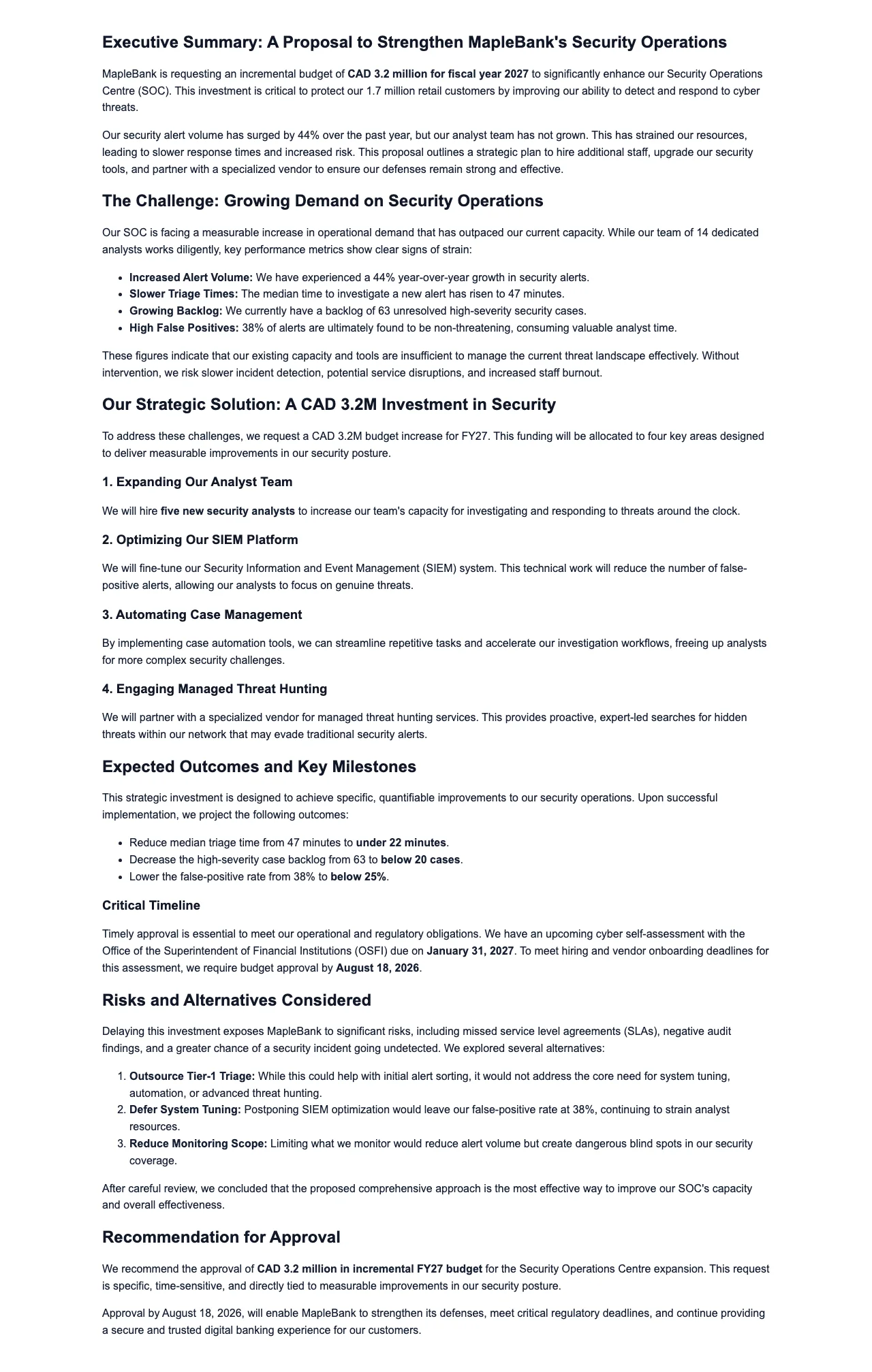
What Makes a Budget Request Survive Leadership Review?
Move past vague asks and PowerPoint decks. Generate structured budget requests with sourced ROI, alternatives analysis, and risk framing that finance leaders expect to see before approving spend.
Present the total amount, phasing schedule, department allocation, and capex vs opex classification. The AI structures the ask in KPI blocks so finance leaders see the complete picture immediately with sourced figures.
Build the financial case with payback period, NPV, IRR, revenue impact, and cost savings. The multi-stage pipeline checks your figures against the source documents you uploaded and adds automatic [1], [2] citations so your ROI projections are traceable and defensible.
Compare options side by side: build vs buy, phased vs full investment, and competing approaches. Comparison Table blocks render each alternative with sourced cost and benefit data so leadership sees that all paths were evaluated.
Frame what happens if the budget is not approved. Cover competitive impact, regulatory exposure, opportunity cost, and timing sensitivity. Pros/Cons blocks present the cost of inaction alongside the investment case.
Show how the budget will be deployed with milestones, resource requirements, dependencies, and go-live targets. Steps blocks structure the execution plan so approvers understand exactly what they are funding and when results will materialize.
Define KPIs, measurement plans, checkpoints, and course-correction triggers. KPI blocks present the metrics that will prove the investment is working, giving leadership confidence that spend will be monitored and adjusted.
How to Generate a Budget Request Note
Enter what you need funding for, the total amount, timing, department, and expected business impact. The AI tailors the budget request to your specific organizational context.
The multi-stage pipeline generates the budget ask, ROI projections, alternatives analysis, risk-of-delay framing, and implementation plan -- checking your figures against the source documents you uploaded and adding automatic [1], [2] citations.
Review the financial projections, adjust assumptions, and strengthen the business case using Quick AI for instant rewrites or Power Edit for full AI dialog.
Save to a workspace for team review, then export to PDF for leadership circulation. Brand compliance applies your Brand Dictionary's preferred and banned terms so the note uses your organization's approved terminology.
What does an AI budget request note include?
| Component | What it covers | Sourced |
|---|---|---|
| Budget Ask Structure | Total amount, phasing schedule, department allocation, capex vs opex classification | Sourced figures |
| ROI Projection | Payback period, NPV, IRR, revenue impact, cost savings | Sourced calcs + auto [1],[2] citations |
| Alternatives Analysis | Build vs buy, phased vs full investment, competing approaches | Comparison Table blocks with sourced cost/benefit data |
| Risk of Delay | Competitive impact, regulatory exposure, opportunity cost, timing sensitivity | Pros/Cons blocks |
| Implementation Plan | Milestones, resource requirements, dependencies, go-live targets | Steps blocks |
| Success Metrics | KPIs, measurement plans, checkpoints, course-correction triggers | KPI blocks |
| Export | PDF for leadership distribution, workspace for team collaboration | Brand Dictionary terms applied |
How This Compares to Traditional Budget Requests
Compare Gixo's AI-generated budget request notes with planning platforms and manual approaches.
| Feature | Gixo AI | Anaplan | Adaptive Planning | PowerPoint Decks |
|---|---|---|---|---|
| Request generation time | Minutes | Hours | Hours | Days |
| Structured budget ask | KPI blocks | Models | Models | Slides |
| ROI projection | Sourced calcs | Built-in | Built-in | Manual |
| Alternatives analysis | Comparison tables | Limited | Limited | Manual |
| Auto [1],[2] citations | Multi-stage pipeline | None | None | None |
| Risk-of-delay framing | Built-in | None | None | Ad-hoc |
| Implementation plan | Steps blocks | Limited | Limited | Manual |
| Success metrics | KPI blocks | Dashboards | Dashboards | Manual |
| Brand compliance | Brand Dictionary terms | None | None | Varies |
| Real-time collaboration | Workspace | Yes | Yes | Limited |
Frequently Asked Questions
Updated