
Gixo legal drafting guide
Start with the parties, terms, governing law, and reference files. Gixo builds a structured legal first draft that counsel can review clause by clause.
Drafting a legal document with Gixo takes six steps: choose the document type, upload reference agreements, fill in parties and terms, set the governing law, generate the draft, then export it after counsel has reviewed it. Gixo Lex covers 22 named draft workflows plus custom drafting — guided confidentiality/IP, services, corporate/equity, employment, real-estate, finance, and general legal documents, including custom drafting — supports agreements with up to 10 parties in distinct roles, and exports in PDF, DOCX, HTML, and TXT. Before review, a draft analysis pass runs five deterministic checks (clause inventory, missing-clause coverage, defined-term consistency, cross-reference validation, and execution readiness), and the clause check flags every mandatory clause the catalogue requires for the selected document type but the draft is missing. Lex plans run $29–$229 per seat per month with a 14-day no-card trial. Gixo helps prepare regulated work. It does not provide legal advice, certify compliance, or replace professional review.
What does Gixo Lex support when drafting a legal document?
Compare the supported drafting workflows, inputs, outputs, and review boundaries before you begin.
| Specification | What Gixo Lex does |
|---|---|
| Named draft workflows | 22 named on the main create flow, plus custom drafting: guided confidentiality/IP, services, corporate/equity, employment, real-estate, finance, and general legal documents, including custom drafting |
| Parties per agreement | Up to 10, each with entity details, representatives, and a distinct role |
| Governing law | Supplied as drafting context; counsel verifies the applicable law and the resulting clauses |
| Reference material | Upload permitted agreements, precedents, and templates to inform drafting; reviewers check how the resulting draft uses them |
| Draft analysis checks | 5 deterministic passes: clause inventory, missing-clause coverage, defined-term consistency, cross-reference validation, execution readiness |
| Missing-clause check | Deterministic checks flag every mandatory clause a document type's catalogue requires but the draft is missing, from 90 clause definitions across 22 named document types |
| Compliance work product | checklists, evidence matrices, working papers, filing support notes, and policy drafts, across 5 execution modes |
| Editing granularity | Clause by clause — rewrite, rephrase, or rescope one clause without touching the rest |
| Export formats | PDF, DOCX, HTML, and TXT |
| Clause-level source provenance | Not shown. Reviewers verify authority and supporting facts independently |
| Legal advice or compliance certification | Not provided. Lex prepares drafts for a qualified reviewer |
| Plans | $29 Solo Pilot (support-routed), $99 Solo, $149 Small Firm, $179 Growing Firm, $229 Marketplace — per seat, per month |
| Trial | 14 days, no card required |
How It Works
Six steps from document type selection to a finished, export-ready legal draft.
Select from contracts, agreements, NDAs, employment documents, terms of service, and other legal document types. Each type loads a tailored intake form and clause structure.
Upload existing agreements, precedent documents, or templates as references. The AI analyzes their structure, clause patterns, and language to inform the draft it produces.
Fill in party details, key terms, obligations, and special requirements. This makes sure the important parts are captured before drafting starts.
Supply the governing law as drafting context; qualified counsel verifies the applicable law, conventions and resulting wording.
Gixo creates a structured legal first draft with numbered sections and clause scaffolding. Reviewers can then refine language clause by clause.
Export the review-ready draft once counsel has checked the wording, structure, and governing context.
Frequently Asked Questions
What should you check when choosing contract redlining software?
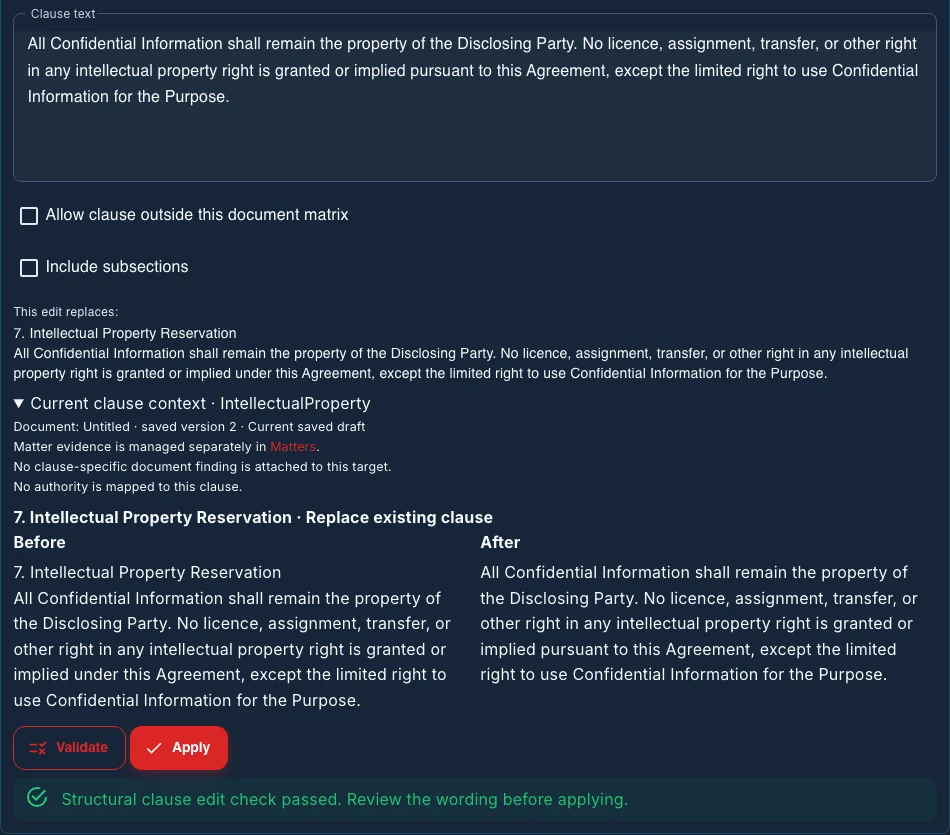
Contract redlining software should make the baseline and proposed wording clear before a contract is circulated. In Lex, inspect a manual clause edit or staged Ask Lex proposal, validate its structure and decide whether to apply it. AI clause wording remains a proposal for qualified review; it is not a whole-document legal verdict.
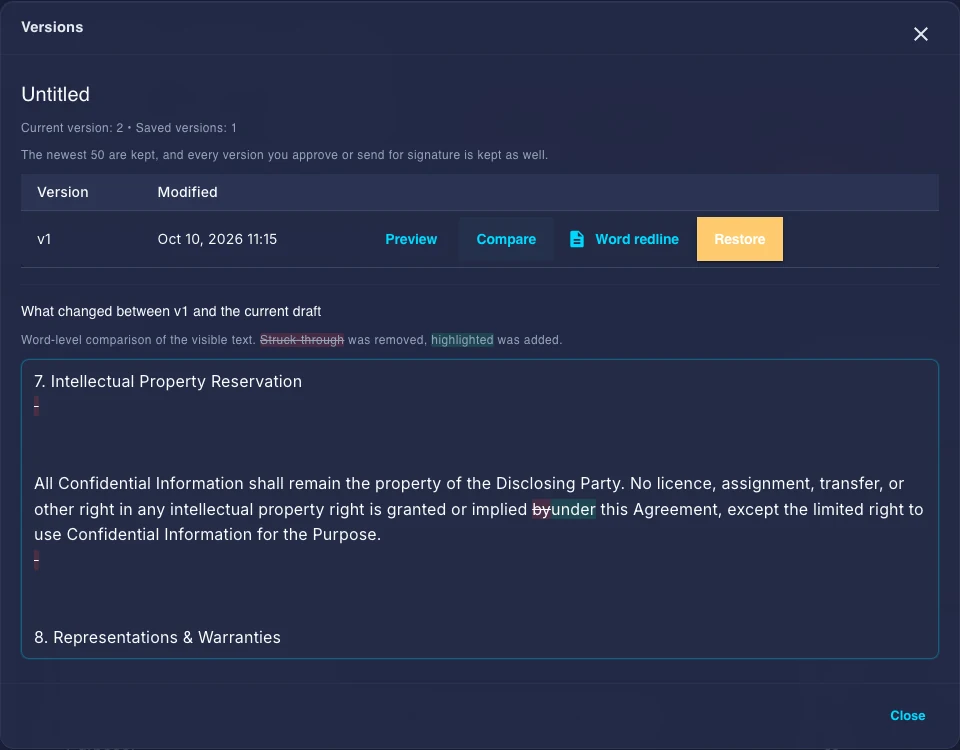
Choose the Word handoff for the document you actually have. A tracked-change DOCX compares the current saved draft with an earlier retained version. For a genuinely retained and mapped imported Word contract, Original-format DOCX with tracked changes preserves the original package for supported edits. Preflight can refuse that original-format export when a change cannot be represented faithfully.
Check the downloaded document in the recipient's Word workflow, including the baseline, changed words, numbering and tables. The visible comparison, structural check and download are separate from legal approval, authority and execution. Inspect the current manual preview and saved-version comparison.
Review the change, then choose the Word handoff
Compare earlier saved drafts and preview a bounded manual clause edit or staged Ask Lex proposal. The preview shows before and after wording; validation checks structure and does not decide legal effect.
A tracked-change DOCX compares the current draft with an earlier saved version. When the original DOCX is retained and mapped, Original-format DOCX with tracked changes preserves that package and marks supported Lex edits. When preflight detects an unsupported edit, it refuses that download. Inspect the recipient file before circulating it.
Current source/version checks can require you to refresh the export preview. A delivery receipt identifies the draft and downloaded bytes; user-reported inspection is separate from legal approval and execution.
Updated