
Make the intake specific
Supply the parties, document kind, jurisdiction, obligations, dates and reference material. Review imported content and retain its source identity before using it in a new matter.
Draft the paperwork GDPR asks for — a privacy policy, a data processing agreement, records of processing activities, and a DPIA — from guided inputs and your own reference material, then hand a clean first draft to your DPO or counsel to review before use.
GDPR compliance software, in this narrow documentation sense, is a workspace that drafts the records the GDPR expects an organization to maintain — a privacy notice, a data processing agreement (DPA), records of processing activities (RoPA, Article 30), and a data protection impact assessment (DPIA) — from structured inputs and your own reference files. Gixo drafts these documents; it does not monitor your systems, scan your data flows, or certify that you comply with the GDPR. Every draft is a starting point that a qualified reviewer — typically your Data Protection Officer or legal counsel — must check, correct, and approve before you rely on it. It is documentation help, not legal advice and not a guarantee of compliance. Drafts export as PDF, DOCX, HTML, and TXT once reviewed.
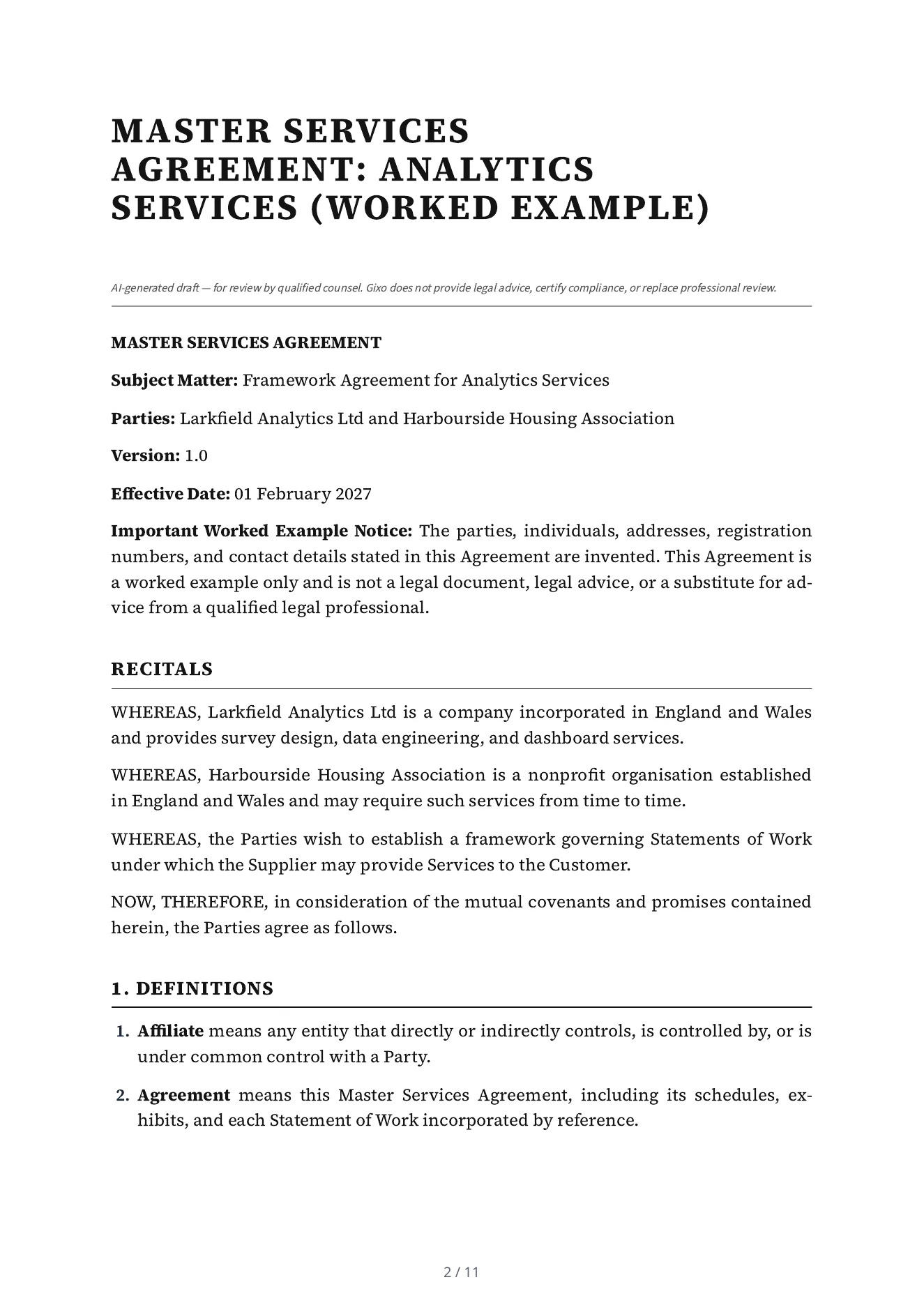
This is a real Lex export for invented parties. Inspect the input and clauses as a worked example, with professional review kept separate from automated drafting and checks.
A master services agreement of 17 numbered parts: definitions, scope of services, service levels and change orders, fees, intellectual property, confidentiality, data protection, warranties, indemnification, limitation of liability, force majeure, term and termination, transition assistance, governing law, general provisions and schedules. Its first page says it is a worked example, not a legal document.
Draft a Master Services Agreement: analytics services between Larkfield Analytics Ltd (Supplier) and Harbourside Housing Association (Customer). Governing law: England and Wales. Effective date: 2027-02-01. Term: Two years from the effective date, renewable by written agreement. Confidentiality: Five years after the agreement ends. The Supplier provides survey design, data engineering and dashboard services to the Customer under statements of work agreed in writing. Excluded: any service not set out in a signed statement of work. Dependencies: the Customer provides access to its systems and a named contact for each statement of work. State on the first page that the parties, people and addresses in this agreement are invented and that it is a worked example, not a legal document. The notice email address of Larkfield Analytics Ltd is notices@larkfield-analytics.example and of Harbourside Housing Association is notices@harbourside-housing.example (both invented).
Read mechanically against the intake, not by a lawyer: 10 of the 12 facts the intake gave are in the draft (the two registration numbers are not printed), nothing is left as a placeholder, and it states two terms the intake did not give, 30 days and 10 Business Days, which Lex chose.
Supply the parties, document kind, jurisdiction, obligations, dates and reference material. Review imported content and retain its source identity before using it in a new matter.
Use the legal workspace's permitted structural tools, Draft Checks and review paths. Compare proposed changes with the saved draft and original material; unsupported Word edits must be handled explicitly.
Have qualified counsel review enforceability, local requirements and the actual commercial intent. Check the current approval state and the downloaded document after a change.
Select the target clause and give Ask Lex a bounded instruction. Missing facts remain visible for review. Inspect the before-and-after proposal, required clause checks and any explicit outside-matrix or mandatory-clause override before versioned application. Use the legal workspace's structural allowlist rather than assuming every general content-editor block is available.
Inspect immutable playbook versions, anchored findings, provenance and precedent variants before staging a change. Matters retain original sources, quotation findings and source-version comparisons. Review extracted obligations for timing, ownership and source revision; negotiation turns and agreement-pack review cells have their own decisions and current-version requirements.
Original-format Word export, tracked changes against an original and saved-version redlines are separate paths. Unsupported edits must be surfaced rather than silently claimed as preserved. Inspect the layout, validator notes and downloaded file, then retain its delivery receipt. Counsel's review applies to the actual matter and version.
Lex does not provide legal advice or certify compliance. The public specimen is not a universally reusable legal template. Word fidelity depends on the supported original-document and saved-version path; unrestricted Power Edit and image insertion are not legal editing features.
The job is not to ask AI for a legal answer. The job is to prepare a draft or artifact that a qualified reviewer can actually work with.
Draft an external-facing privacy notice covering the categories of data, purposes, legal bases, retention, and data-subject rights you tell it about — then edit it to match how your organization actually processes data.
Prepare a controller–processor DPA draft with the clauses GDPR Article 28 contemplates — instructions, confidentiality, sub-processors, security, and assistance — for your counsel to review against the specific relationship.
Draft an Article 30 record of processing activities from the processing operations you describe, structured so gaps and missing detail stay visible instead of being smoothed over.
Prepare a data protection impact assessment draft — describing the processing, necessity and proportionality, risks to data subjects, and candidate mitigations — as a working document your DPO refines, not a finished sign-off.
Where you have not supplied a detail — a legal basis, a retention period, a sub-processor — the draft surfaces it as a review item rather than inventing a plausible-sounding answer.
Export the reviewed draft as PDF, DOCX, HTML, and TXT so it can move into your DPO's files, a vendor package, or your records of compliance work.
Choose the artifact you need to draft — privacy notice, DPA, RoPA, or DPIA — so the workspace prompts for the right inputs.
Describe the data you process, the purposes and legal bases, the parties, and any existing policies or templates you want the draft to reflect. The draft is only as accurate as what you supply.
Gixo produces a structured draft with the expected sections, leaving unanswered points marked as open items rather than filling them with guesses.
A qualified reviewer validates the legal bases, factual claims, and specifics against your actual processing, corrects the draft, and approves it before you publish or sign anything.
The phrase covers documentation and operational privacy jobs that can overlap in current products. One watches your systems and collects proof that your controls are operating. The other writes the documents the regulation expects you to hold. Work out which one you came here for before comparing anything.
Gixo Lex is the second column. If your problem is that the documents do not exist yet, or that the ones you have were written for a different company, the drafting side is where the time goes and verify whether the platform also drafts or edits those artifacts. If your problem is proving that a control operated every day for the past quarter, that is the first column and Gixo does not do it. Past a certain size most organizations end up with both — and the drafting half is the cheaper one to start with, because a platform monitoring controls you have never documented has nothing to check against.
GDPR "compliance software" spans two very different jobs: drafting the documentation, and operating your data protection program. Gixo does the first. Be clear on the boundary before you evaluate it.
| Capability | Gixo (documentation drafting) | Continuous-monitoring platforms |
|---|---|---|
| Draft privacy notice, DPA, RoPA, DPIA | Yes — first drafts from your inputs | Varies; often template libraries |
| Human review before use | Required — drafts are for your DPO / counsel | Also expected |
| Scan systems / discover data flows automatically | No — it works from what you provide | Often yes |
| Continuous control monitoring / alerting | No | Often yes |
| Certify or guarantee GDPR compliance | No — no tool can; compliance is your organization's responsibility | No |
| Legal advice | No — documentation help only | No |
Updated