Workflow-specific products Content, decks, briefs, proposals, legal, and sales each have a clearer buying path.
Review before delivery Draft, edit, collaborate, approve, and export in the same workspace.
Security + procurement path Security policy, support, and Azure Marketplace buying are public.

Gixo Keystone · Time and budget

Project time tracking software with a reviewable budget trail

Record time against the project work, review submitted entries and compare approved actuals with your budget. Keep the numbers explainable before you use them in a client or finance conversation.

Project access, your subscription and the current release determine which controls are available.

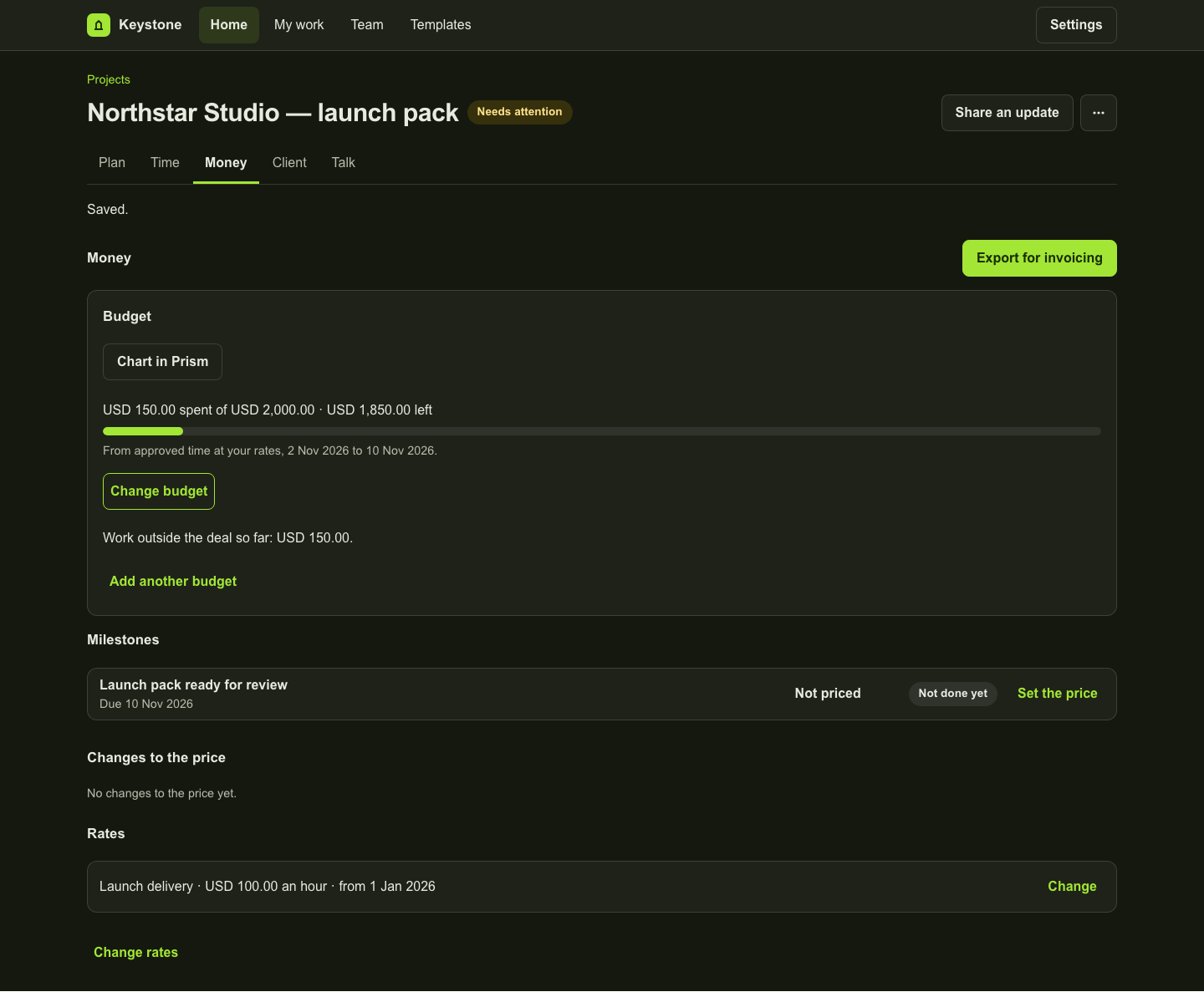
Money showing USD 150 approved recorded value against a USD 2,000 budget.
The local example records USD 150 against a USD 2,000 budget. The balance is not cash spend, recognised revenue or accounting profit.

Capture the work and the rate it used

Record the work date, duration, task and billability. A time entry retains its captured rate; editing a rate later does not silently reprice the earlier work. Entries without a rate stay visible as incomplete monetary information.

Review the submitted record

Review the week’s entries, then use Send week for approval. Approval and rejection preserve the submitted details and the decision. Self-approval, where allowed, is identified; it should not be presented as independent review.

Compare like with like

A named budget can cover a date range and time or value limits. Approved net recorded time and value form the actuals. Pending and rejected time remain separate. Different currencies are not converted into a made-up combined balance, and overlapping budgets are not added together.

Correct approved work visibly

Approved entries are retained. A permitted correction records a linked negative adjustment and its reason; replacement work is recorded and reviewed separately. Earlier records remain part of the trail.

Prepare the next finance step

Use the supported invoicing CSV for the records it contains, then review them in your invoicing process. Keystone’s recorded value is not payroll cost, recognised revenue, cash spend or accounting profit. A native accounting posting is not part of this workflow.

Inspect the work

A fictional project in the actual workspace

These examples use fictional data in an isolated local preview. Each caption explains what its screen establishes. They do not represent a customer result.

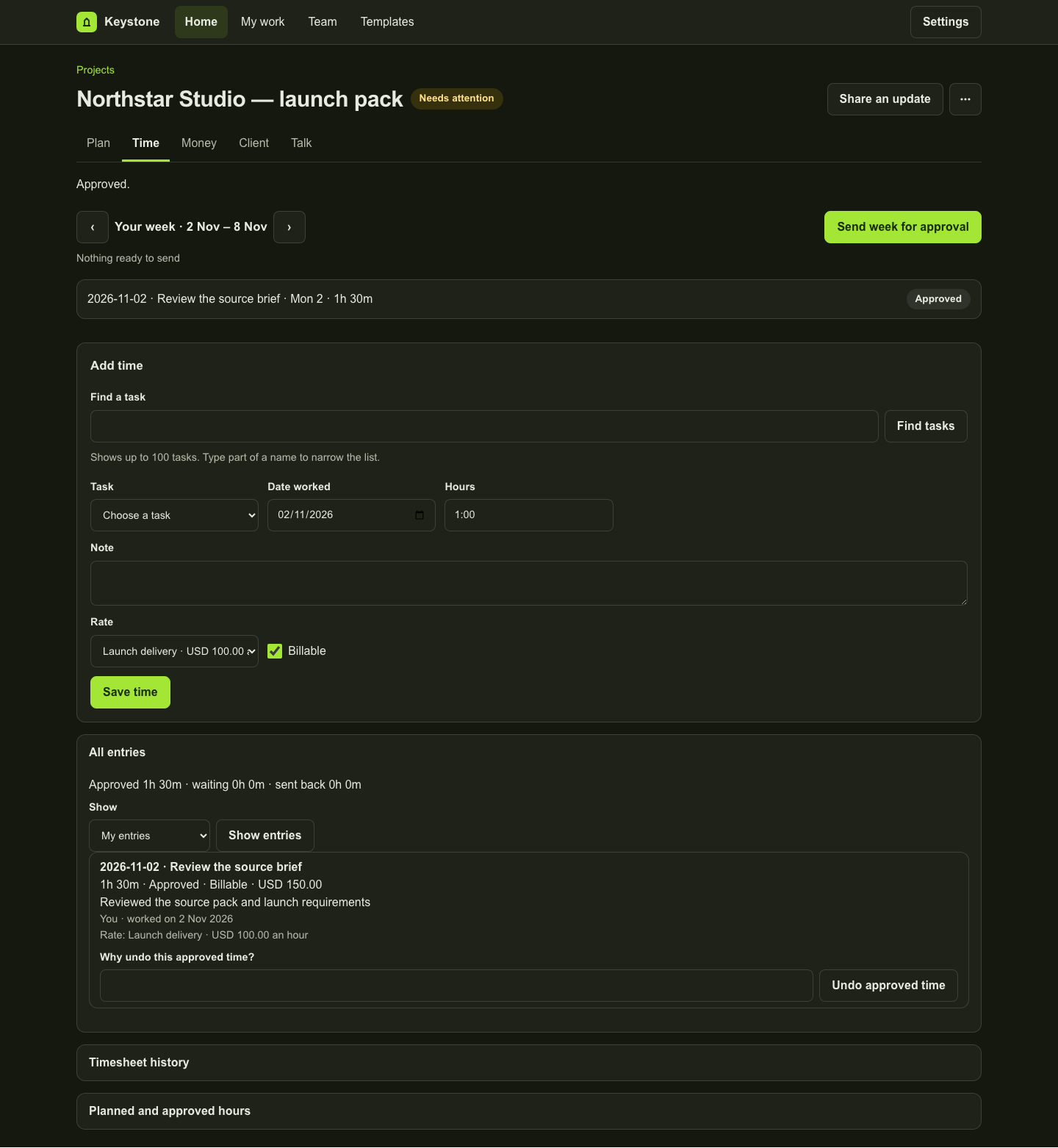
A retained one-hour-thirty-minute entry with USD 150 recorded value and identified self-approval.
Fictional 1h 30m entry at USD 100/hour, explicitly self-approved in the local fixture. This demonstrates retained recorded value, not independent review or payroll.
Money showing USD 150 approved recorded value against a USD 2,000 budget.
The local example records USD 150 against a USD 2,000 budget. The balance is not cash spend, recognised revenue or accounting profit.

Questions about time and budget

Does Keystone calculate project profitability?

Recorded approved value and budgets can inform a commercial review, but they are not a complete profitability calculation. Payroll costs, recognised revenue and accounting profit are not established by these totals.

Is time logging the same as time approval?

No. A draft entry, a submitted entry and approved actuals are separate states. The Starter tier includes time logging; Professional adds time approvals and budgets.

Product copy reviewed 2 November 2026.