
Frame the decision
Name the audience, requested decision and source pack. Review imported tables and extracted text; record gaps instead of allowing a polished narrative to conceal them.
Bring the teams' current progress notes, metrics and blockers to draft a cross-team status report with proposed risk and RAG sections. Business attempts number reconciliation where sources are present and surfaces generated-draft findings for review. Check source dates, reporting definitions and unrepaired figures before sharing the rollup.
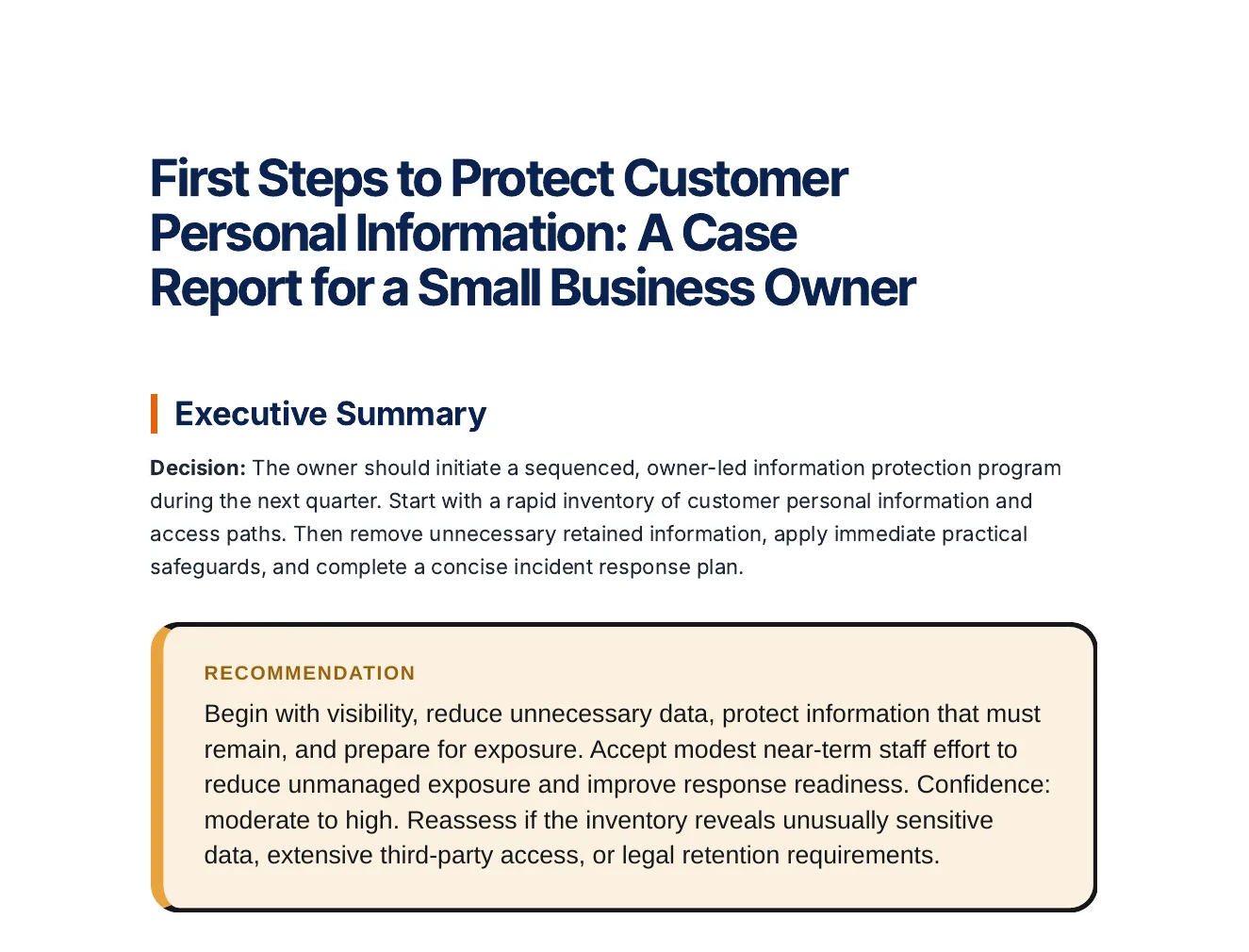
Inspect an actual Business report. A readable decision brief needs the question, supplied evidence, options, assumptions and next decision—not just a shorter source document.
A decision, options compared on stated criteria, risks and a roadmap, every statement labelled Fact, Inference or Assumption.
Business question: Which actions should a small business that stores customer personal information take first to protect it and to be ready if it is exposed? Decision maker: The owner of a small business. Timeframe: The next quarter. Context: A small business collects customer personal information and keeps it in paper files and on computers. It has no dedicated security staff. Refer to it as 'the business' throughout and do not give it a name. Options: Take stock of the personal information it keeps and where it is stored; Reduce what it keeps to what the business needs; Lock down the information it keeps with practical safeguards; Prepare a plan for responding to a data breach. Criteria: How much personal information at risk it removes or protects; How realistic it is for a small team without security specialists; How well it limits the harm if information is exposed. Constraints: No dedicated security staff; Limited time and budget.
Open the full export and compare its statements with the cited sources before reuse.
Name the audience, requested decision and source pack. Review imported tables and extracted text; record gaps instead of allowing a polished narrative to conceal them.
Separate supplied facts, calculated values, assumptions and recommendations. For variance work, reconcile the period, unit, baseline and actual value before interpreting the direction of a difference.
Use options, trade-offs, risks and named next actions. Review the final artifact and, when using Analyst calculations, inspect the calculation evidence separately from the narrative.
Select source documents, case context, working notes, assumptions, options and decision constraints before generation. Inspect claims, metrics, exact quotations, source tables and conflicting figures. Review decisions are scoped to the source or artifact and can become stale after evidence changes; unresolved evidence should stay visible.
Keep investment, recurring costs, benefits, delays, growth, discount assumptions and scenario probabilities explicit. Inspect deterministic cash flow and the available return, payback and sensitivity outputs. Compare scenarios before selection, and inspect the formula workbook or calculation receipt separately from the narrative recommendation.
Inspect the dossier's source tables, working rows and columns, calculation ledger and workbook handoff. Metric packs retain reviewable calculation and source context. Preview source replacements for a new period before accepting them. Execution records distinguish an action owner, baseline, target, measured value, data source and the reason for a status change.
A calculation can be replayable while the supplied inputs remain wrong. A generated report is decision support, not independent diligence, audit assurance or investment advice.
Multi-team status is hard because the updates live in different formats, voices, and places. Gixo turns the pile of updates you collect into a single structured report leadership can actually read.
Paste or upload each team's notes, standups, and metrics. Gixo synthesizes them into one rollup with a per-team status section and a cross-team summary — instead of you stitching spreadsheets together by hand.
The rollup pulls the blockers, dependencies, and risks out of the noise and into their own section, so a stalled hand-off between two teams does not stay buried in one team's notes.
Get a red/amber/green status across initiatives at the top, with the detail underneath. Executives read the RAG; program managers read the detail — from the same document.
When you upload source files, the multi-stage pipeline adds automatic [1],[2] citations. Where a brief has sources - files you upload or connect, pages you add, or the search results web research drew on - a repair stage compares the figures in the paragraphs, lists and table body cells of the draft with the numbers in those sources, and rewrites any sentence or cell whose figure it cannot find there, substituting the source value or dropping the claim. A table heading or row label is read as context, not as a figure, and a total, difference or share the table works out from its own cells is never rewritten. That is reconciliation against your own sources, not an independent fact-check, and it is silent: nothing is marked up in the delivered brief, and a sentence it cannot repair, or a draft it cannot finish, keeps its original figures. What it still could not match is listed in the Evidence tab; the FAQ below sets out what that list can and cannot tell you.
Ask each team lead to confirm the status, reporting date and source for their passage. On Business Professional or higher, authorized colleagues can comment on and review the saved update. Quick AI and Power Edit revise selected text; resolve save conflicts and confirm the final version before distribution.
Describe the project update and intended audience, add the sources you want to use, and review the proposed outline and missing evidence before generating. Next week starts from a proven template; you swap in the new updates and generate, instead of rebuilding the report from a blank page.
In: whatever you already have from each team — Slack thread exports, standup notes, a metrics dump, last week's update doc, a paragraph someone typed. No special format, and no integration to set up.
Out: a single structured rollup built from 20+ semantic blocks — an executive summary, a RAG status across initiatives, a per-team status section, a consolidated risks-and-blockers list, key metrics (checked against your sources and cited), and next steps. Export it to PDF, or copy it straight into your status channel.
The multi-stage pipeline does the consolidation, the number-checking when you supply sources, and the formatting; you bring the source updates and the judgment about what actually matters this week.
Most status reports fail the same way — they list activity instead of answering the three questions the reader actually has: are we on track, what changed since last time, and what do you need from me. These seven sections answer them.
| Section | What it answers | What breaks without it |
|---|---|---|
| Header | Which project, which reporting period, who wrote it, who it goes to | The report gets forwarded and nobody can tell whether it is this week's or last month's |
| Overall status (RAG) | Are we on track — in one word, at the top | Readers infer status from paragraphs, and two readers infer differently |
| Progress since the last report | What actually moved, measured against what was promised last period | Activity gets mistaken for progress, and a stalled workstream reads as busy |
| Work planned for the next period | What will be true by the time you write the next one | There is no baseline to score the next report against |
| Risks, issues and blockers | What could go wrong and what already has — by severity, each with a named owner and a date | Bad news arrives at the deadline instead of while there is still time to act |
| Decisions and asks | The specific thing the reader has to do, and by when | The report is read, nodded at, and nothing gets unblocked |
| Metrics: schedule, budget, scope | The numbers against plan, each traceable to a source | "On track" stays an opinion rather than a measurement |
Two rules make the difference between a status report that gets read and one that gets skimmed. Length is a discipline, not a style choice — the rollup belongs on one screen, with the detail underneath for the people who need it. And every red or amber carries a named owner and a re-assessment date: a color without an owner is decoration, not status.
The same seven sections, filled in. The figures are illustrative — the shape is the point.
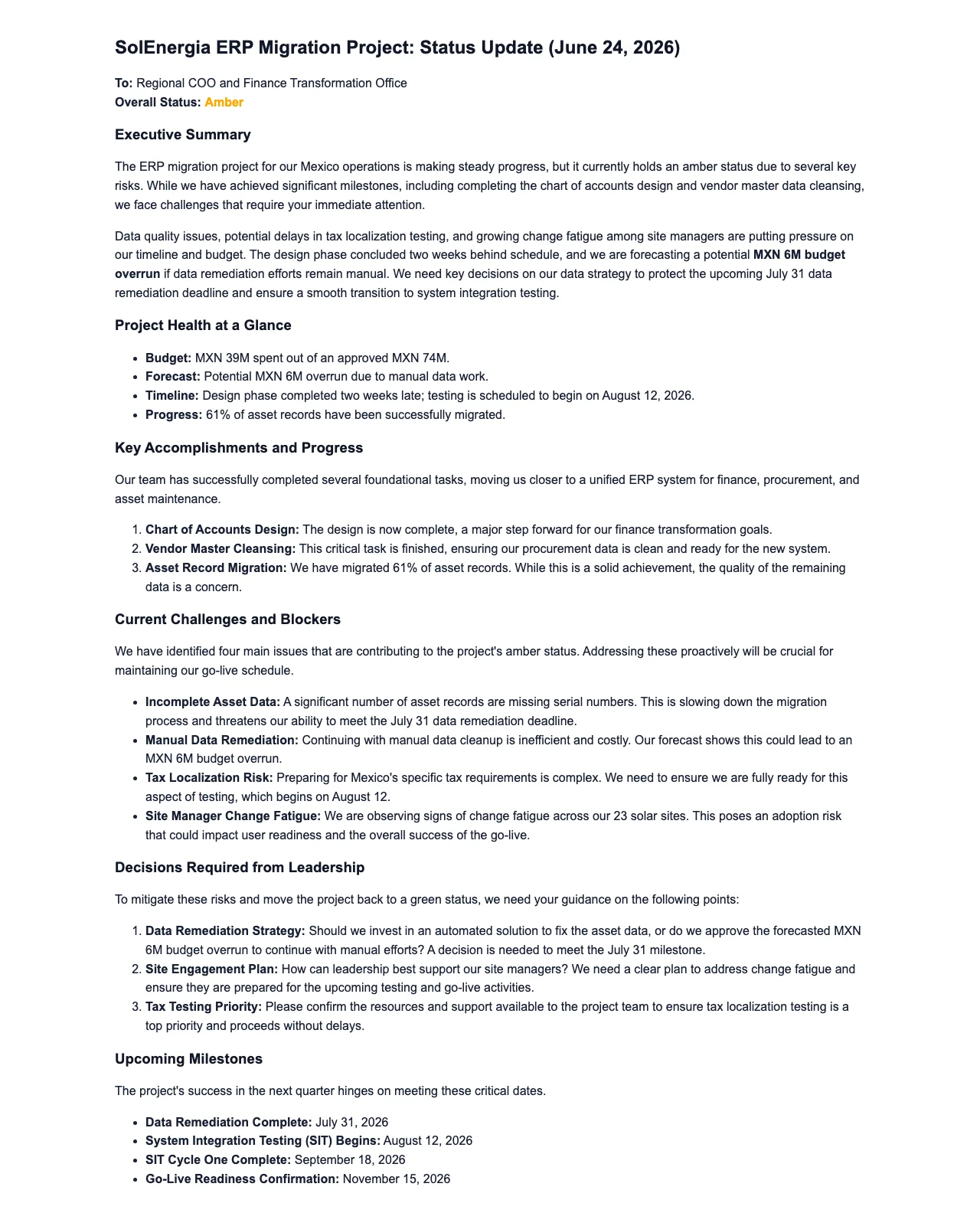
Atlas ERP migration — status report, week ending 14 March. Prepared by the program office. To: steering committee and the four workstream leads.
Overall: amber. Delivery remains on plan for the July cutover; the amber is data migration, where the second dry run finished three days late. Finance: green. Integrations: green. Data: amber. Change & training: amber.
Progress since 7 March: dry run 2 completed across all 14 source tables, against a target of 12. Integration testing closed 31 of 38 open defects. Training content signed off for finance and procurement. Not done: the vendor sandbox refresh, which slipped to 17 March.
Next period: dry run 3 on the reconciled data set, the remaining 7 integration defects closed, and the cutover runbook out for review by 21 March.
Risks, issues and blockers: High — data reconciliation is on the critical path; a third late dry run puts the July date at risk. Owner: data lead. Re-assessed 21 March. Medium — two of the four named super-users have not been released by their managers, which pushes training preparation into the cutover week. Owner: change lead. Needs a decision this week.
Decisions and asks: release the two super-users for four weeks from 24 March, or agree a reduced training cohort for go-live. That is the only ask this period.
Metrics: schedule 68% complete against a 71% plan; budget spent $1.42M of the $2.10M approved; scope: 3 change requests raised, 2 approved. Figures written into its paragraphs and lists, like these, are checked against the sources you supplied — the plan, the finance export, the change log — and a sentence whose figure is not in one of them is rewritten or dropped rather than filled in — nothing is marked up in the rollup itself, so check it against those sources before it goes out.
Cadence is a design decision, not a habit. Match the reporting interval to how fast the project can actually change, or you will write reports nobody needed and miss the one that mattered.
Whatever interval you pick, most of the value comes from the structure staying identical between reports. A reader who knows where the RAG sits and where the asks sit is done in ninety seconds; a reader facing a new layout every cycle reads none of them. That is the argument for treating your format as a project report template rather than writing a fresh document each period — one agreed structure, settled once, filled with new content each time. In Gixo that template is a saved workspace: the plan, the block layout and the section order carry over, so each cycle you swap in the new updates and generate instead of rebuilding the report.
Collect whatever every team already produces — notes, metrics, standup summaries — and add them as source material. The more you provide, the more grounded the rollup.
Describe the project update and intended audience, add the sources you want to use, and review the proposed outline and missing evidence before generating. Save it as a workspace so the structure carries over each cycle.
Business drafts a consolidated status report from the supplied updates and reviewed outline. It attempts source-based number reconciliation and requests citation markers where supported. Check material figures, owners, dates, missing references and the proposed RAG interpretation before distribution.
Ask team leads to check their passages. On Business Professional or higher, comments and saved-draft review require an authorized content role. Review any AI edit, resolve save conflicts and confirm the final version before distributing it.
| Evaluation area | Gixo Business | What to check in manual rollups and general AI assistants |
|---|---|---|
| Job and inputs | Organize the updates and dates the teams supply; Business does not silently synchronize project boards. | Test the current product or scoped service against the same question, sources and deliverable. |
| Evidence review | Inspect source coverage, uploaded-file citation markers and generated-draft Evidence and citation findings. | Check source support and current research capabilities; a citation alone does not confirm the conclusion. |
| Revision and delivery | Edit the brief, retain saved versions and review the final export. | Test the actual review, collaboration, version and export workflow you need. |
| Timing and responsibility | Generation time varies with the job and source pack; accountable people review the result. | Compare the agreed scope and review responsibilities rather than assume fixed speed or price. |
Gixo is the consolidation, writing, and source-checking layer for status. You bring the updates; it produces the report. That keeps it useful for any team, in any tool, on day one — there is nothing to connect and no admin setup.
It is not a live project-tracking tool. Gixo does not sync with Jira, Asana, Linear, or Slack, and it does not silently pull status while you sleep. If you want a report built from updates your teams already write, that is exactly what this does. If you want a tool that reads your boards in real time, that is a different category of product.
Bring each team's updates to prepare a structured cross-team rollup with proposed risks and a RAG view. Inspect source dates, figure findings and citation markers before sharing; generation and review time depend on the material and decision required.
Updated