
Gixo Prism framework editor guide
Edit a matrix, funnel, pyramid, cycle, or other framework through its text fields and brand colors. Update the visual, review the result, then share or download it with the permissions available to you.
Which product and access do you need?
Framework artifacts belong to Gixo Prism. A Business subscription alone does not include the framework editor. Business handles briefs and recommendations, with the decision logic inside the report; use Prism when you need the visual framework or a standalone decision artifact. An artifact shared with you can also grant viewing or download access according to its permissions.
For example, use a cycle to explain how onboarding, feedback, and activation reinforce one another. Use a matrix to compare options on two named axes. If you need weighted scores and a recommendation, see the decision artifact guide instead; decision artifacts are made in Gixo Prism too. The layout communicates your reasoning; it does not verify your evidence or make the decision for you.
Edit and review a framework
The owner edits structured fields and updates the composed visual. Review the refreshed preview before sending it to anyone.
Open your framework
Open a saved framework from the Prism library. Check its title, layout and contents before editing. Owners can edit; a shared viewer sees the controls allowed by their access.
Edit text and brand colors
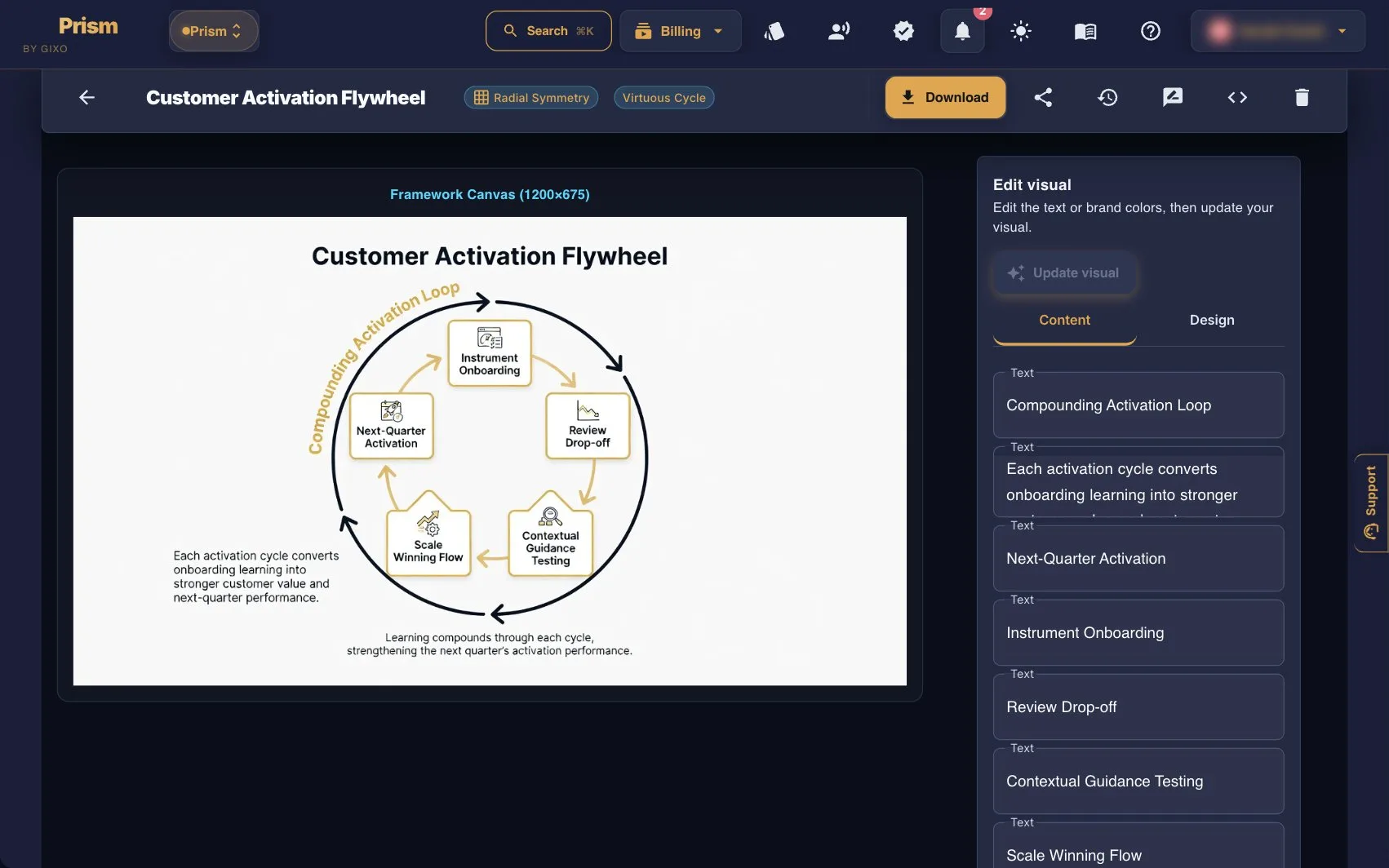
Use the Content tab in Edit visual to revise the available text fields. For the activation cycle shown above, you might clarify a stage label or replace its explanation. Use the Design tab for the available brand colors. These controls do not let you drag shapes or rearrange the canvas.
Update and inspect the visual
Select Update visual after changing the fields or colors. The previous preview remains visible while the new image is prepared. Inspect labels, fit, contrast and the meaning of the layout after the update; do not assume a saved text change has already appeared in the preview.
Download or share the reviewed result
The framework Download menu offers HTML when your access permits downloads. Owners also have PNG export. View-only access does not include downloads. Owners can use Share to grant access; review the recipient permissions before sending the link.
What the editor changes
Structured text editing
Edit the text fields supplied for the artifact. There is no direct editing of individual shapes or image pixels. Keep stage names concise and check longer explanations in the refreshed preview.
Brand colors with an update step
Change the available palette in Design and select Update visual to rebuild the preview. This is not instant theme switching across a freely editable slide canvas.
A composed visual
The framework is presented as an image. Its layout gives the content spatial meaning, such as the stages of a funnel or positions in a matrix. The editor does not expose free placement or arbitrary restructuring.
Permissions govern handoff
Editing is owner-only in this workspace. Sharing can provide viewing or download access. The HTML download carries the framework presentation; it is not a promise of editable PowerPoint shapes or a native PDF export.
Frequently asked questions
Are framework artifacts included in Gixo Business?
Framework artifacts are Prism-owned. Business alone does not unlock their editor. Use Business for briefs and recommendations, and Prism for visual frameworks and standalone decision artifacts. A shared artifact may grant viewing or download access without granting ownership or editing.
Can I move shapes or edit the preview directly?
No. Edit the available text fields and brand colors, then select Update visual. The preview is a composed image rather than a drag-and-drop canvas. Review the new image after it is rebuilt.
Which formats can I download?
The framework workspace offers HTML to users with download permission and PNG to the owner. A view-only share does not include downloads. This guide does not promise a native PDF or editable PowerPoint export from the framework workspace.
Does a framework validate the underlying analysis?
No. A matrix, funnel or cycle organizes the information you supply. You still need to check facts, labels, evidence and conclusions. Structural warnings are not evidence that the business reasoning is correct.
Explore more guides
Choose structured rendering or a reviewed AI visual
Use deterministic makers when you already have the selected values, labels or relationships. Rendering preserves accepted structured inputs within the chosen display settings and shape limits; it does not prove that the source is correct.
For an AI infographic or framework, bring your material and review the generated image. Supported retained source fields can be edited and recomposed; the geometry of the generated image stays locked. Whole-image placement is different from native object editing, and every AI label, number and visual detail needs inspection.
Document to Visual is a separate reviewed structured proposal: selected chart cells come from extracted tables and unmatched numeric values block that proposal. A value matched in a source still needs the right label, unit and period. These checks do not cover every infographic entrypoint.
Updated